- Schema markup is structured data code added to your website that helps Google understand your content explicitly rather than guessing what it means
- Schema markup makes your pages eligible for rich results like star ratings, prices, and FAQs that dramatically improve click through rates
- JSON-LD is Google's recommended format for implementing schema markup and it is the easiest to add without touching your main page content
- Schema markup is not a direct ranking factor but pages with rich results consistently earn more clicks than standard blue links at the same position
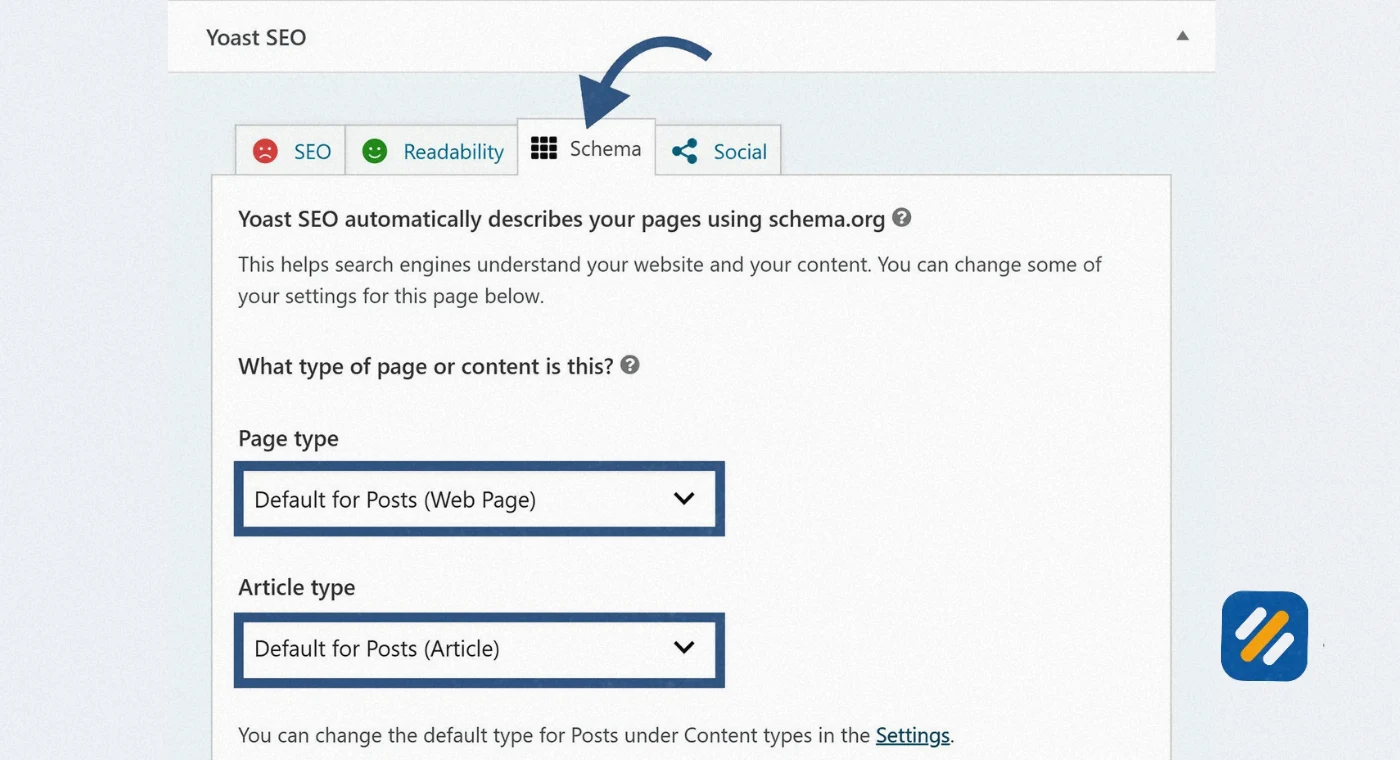
- Rank Math and Yoast SEO both add schema markup automatically on WordPress, making implementation beginner-friendly without writing any code
1 What Is Schema Markup and Why Does It Matter for Your Website
Most websites give Google their content and hope Google figures out what it means. Schema markup does something completely different. It tells Google exactly what everything on your page means, with no room for interpretation.
Schema markup is structured data code that you add to your website to communicate explicit information about your content to search engines. Instead of Google inferring that the number "$149" on your page might be a price, schema markup tells Google directly: this is the price of this specific product, it is in US dollars, and the product is currently in stock.
That shift from implied to explicit is the entire point of schema markup. And it has a very real consequence in how your website appears in search results.
When Google understands your content explicitly through structured data, it can display your pages as rich results, which are enhanced search listings that show additional information like star ratings, review counts, product prices, FAQ answers, event dates, and recipe details directly in the search results page.
Here is why that matters in practice. I have implemented schema markup on client websites in multiple industries and the click through rate improvement from earning rich results is consistently significant. A product page sitting at position four with star ratings and a price displayed can outperform the page at position one that shows only a blue link and a description.
Schema markup does not move your ranking. But it can make a lower ranked page earn more clicks than a higher ranked competitor. In SEO terms, that is one of the highest return on investment technical improvements you can make.
2 How Schema Markup Actually Works
Understanding how schema markup works behind the scenes helps you implement it correctly and troubleshoot it when something goes wrong.
When Google's crawlers visit your webpage, they read your HTML from top to bottom. Inside that HTML, schema markup appears as a special script block that uses a standardised vocabulary developed by Schema.org. This vocabulary was created in 2011 as a joint project between Google, Bing, Yahoo, and Yandex specifically to give all major search engines a common language for understanding web content.
The markup uses specific property names and values that search engines universally recognise. For example, the property name "name" inside a Product schema type always refers to the product's name. The property "priceCurrency" always refers to the currency code. There is no ambiguity. Every property has an agreed meaning.
When Google reads this structured data it adds the information to its Knowledge Graph, which is a massive database of entities, facts, and relationships that Google uses to understand the real world. Schema markup essentially tells Google: this page is about this specific entity, with these specific properties, and it belongs in this category of your Knowledge Graph.
This is why schema markup matters beyond just rich results. It helps Google build a more accurate picture of what your website is and what it covers, which feeds into how Google evaluates your overall topical authority and entity relevance.

3 Schema Markup vs Structured Data | Understanding the Difference
These two terms are often used interchangeably but they are not exactly the same thing and understanding the difference prevents confusion when implementing them.
Structured data is the broader concept. It refers to any organised format of data that makes information machine-readable. A spreadsheet is structured data. A database table is structured data. An XML feed is structured data.
Schema markup is a specific type of structured data that uses the Schema.org vocabulary. It is the implementation standard that search engines have agreed to recognise and reward with rich results.
Think of it this way. Structured data is the concept. Schema markup is the specific language and format search engines use. All schema markup is structured data but not all structured data is schema markup.
For SEO purposes, when someone says "add structured data to your page," they almost always mean add schema markup using the Schema.org vocabulary in one of the three supported formats: JSON-LD, Microdata, or RDFa.
4 JSON-LD, Microdata, and RDFa — Which Format Should You Use
There are three ways to write schema markup code. Google supports all three but strongly recommends one of them. Here is what each one is and why the choice matters:
| Format | How It Works | Google's Position | Best For |
|---|---|---|---|
| JSON-LD | Separate script block in page head or body, does not touch visible HTML | Strongly recommended by Google | All websites, especially WordPress |
| Microdata | Embedded directly into HTML elements using special attributes | Supported but not recommended | Legacy sites, very specific use cases |
| RDFa | Similar to Microdata, attributes added to existing HTML | Supported but not recommended | Rarely used in modern SEO |
JSON-LD stands for JavaScript Object Notation for Linked Data. It is the format all major SEO tools generate by default and the format Rank Math and Yoast automatically output on WordPress.
The reason Google recommends JSON-LD is practical. Because it lives in a separate script block rather than being woven into your visible HTML, you can add, update, or remove schema markup without touching your page's content or design. On Microdata and RDFa, changing the markup requires editing the visible HTML itself, which creates a higher risk of accidentally breaking your page.
For every website I work on, including all client sites and SEOWithRoman.com, JSON-LD is the only format I use. It is cleaner, easier to maintain, and easier to validate.
5 The Most Important Schema Markup Types and What Each One Does
Google supports over 35 schema markup types that are eligible for rich results. You do not need to know all of them. Here are the ones that matter most for small business websites, blogs, and personal brands:
| Schema Type | What It Enables | Who Should Use It |
|---|---|---|
| Article | Displays headline, author, date in search results and Google News | Bloggers, news sites, content publishers |
| Product | Shows price, rating, availability, delivery info for product pages | Ecommerce stores, online retailers |
| Local Business | Confirms address, phone, hours for local search results and Maps | Any business with a physical location |
| FAQ | Expands questions and answers directly in search results | Any page with a frequently asked questions section |
| Review and AggregateRating | Shows star ratings and review counts in search listings | Product review sites, service directories |
| Breadcrumb | Displays page hierarchy path under the title in search results | Any multi-level website with clear categories |
| Person | Identifies the author or public figure associated with a page | Personal brand websites, author pages |
| Organization | Tells Google your business name, logo, contact details | Every business website homepage |
| Event | Shows event date, time, location in search results | Event organisers, ticketing pages |
| Recipe | Displays cooking time, ingredients, ratings for recipes | Food blogs, recipe websites |
| HowTo | Shows step by step instructions directly in search results | Tutorial websites, DIY blogs |
| VideoObject | Adds video thumbnail and duration to search listings | Any page featuring an embedded video |
For SEOWithRoman.com specifically, the priority schema types are Article on every blog post, Person on the About page, Organization on the homepage, and FAQ on any article that includes a questions section.
6 Real Schema Markup Examples You Can Study and Use
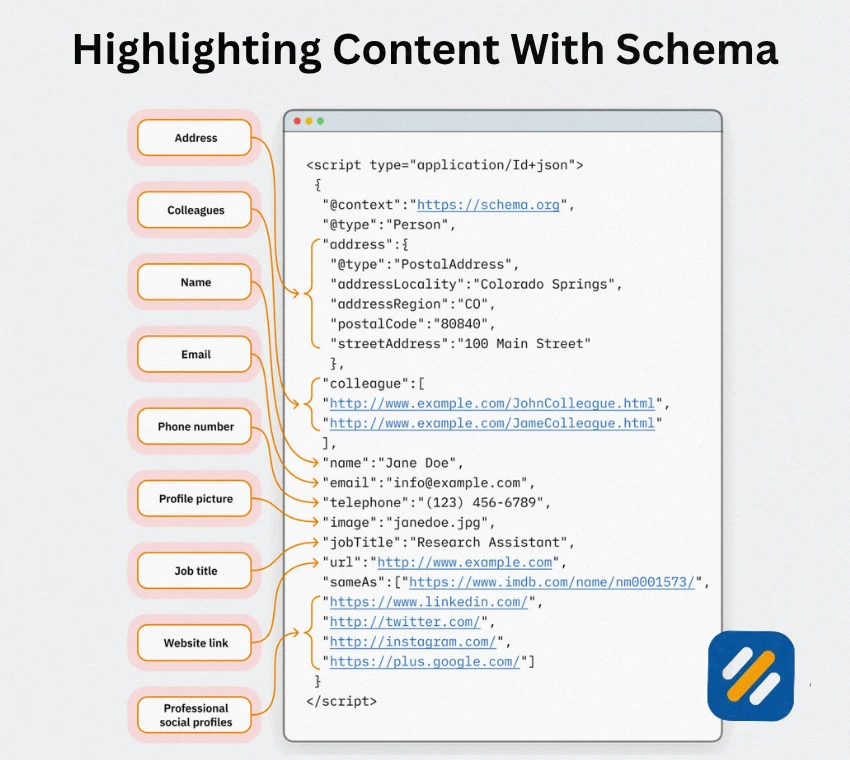
The fastest way to understand how schema markup is written is to see real examples. Here are three JSON-LD examples covering the most common use cases:
Article Schema Markup Example:
This goes in the head section of any blog post page.
script type="application/ld+json"
@context: https://schema.org
@type: Article
headline: What Is Schema Markup and How Does It Work
image: https://seowithroman.com/images/schema-markup-guide.jpg
author:
@type: Person
name: Muhammad Roman
url: https://seowithroman.com/about
datePublished: 2026-01-15
dateModified: 2026-06-01
publisher:
@type: Organization
name: SEO With Roman
logo:
@type: ImageObject
url: https://seowithroman.com/logo.png
/script
Local Business Schema Markup Example:
This goes on the homepage or contact page of any local business.
script type="application/ld+json"
@context: https://schema.org
@type: LocalBusiness
name: SEO With Roman
url: https://seowithroman.com
telephone: +1-XXX-XXXXXXX
address:
@type: PostalAddress
addressLocality: Lahore
addressRegion: Punjab
addressCountry: PK
priceRange: $$
description: Senior SEO Specialist helping US and UK small businesses rank on Google
/script
FAQ Schema Markup Example:
This goes on any page that includes a questions and answers section.
script type="application/ld+json"
@context: https://schema.org
@type: FAQPage
mainEntity:
@type: Question
name: Does schema markup directly improve Google rankings
acceptedAnswer:
@type: Answer
text: No. Schema markup is not a direct Google ranking factor. However it makes your pages eligible for rich results which can significantly improve click through rates and bring more traffic even without a ranking change.
@type: Question
name: Which schema markup type should a beginner add first
acceptedAnswer:
@type: Answer
text: Start with Article schema on every blog post and Organization schema on your homepage. These two types cover the majority of pages on a content website and are the easiest to implement correctly.
/script
7 How to Add Schema Markup to Your WordPress Website Step by Step
For WordPress users, adding schema markup does not require writing any code manually. Here is the step by step process using Rank Math, which is the plugin already recommended for SEOWithRoman.com:
Step 1: Confirm Rank Math is installed and active.
Go to your WordPress dashboard, click Plugins, and verify Rank Math SEO is listed as active. If it is not installed, go to Plugins then Add New, search for Rank Math, and install it.
Step 2: Configure your global schema settings.
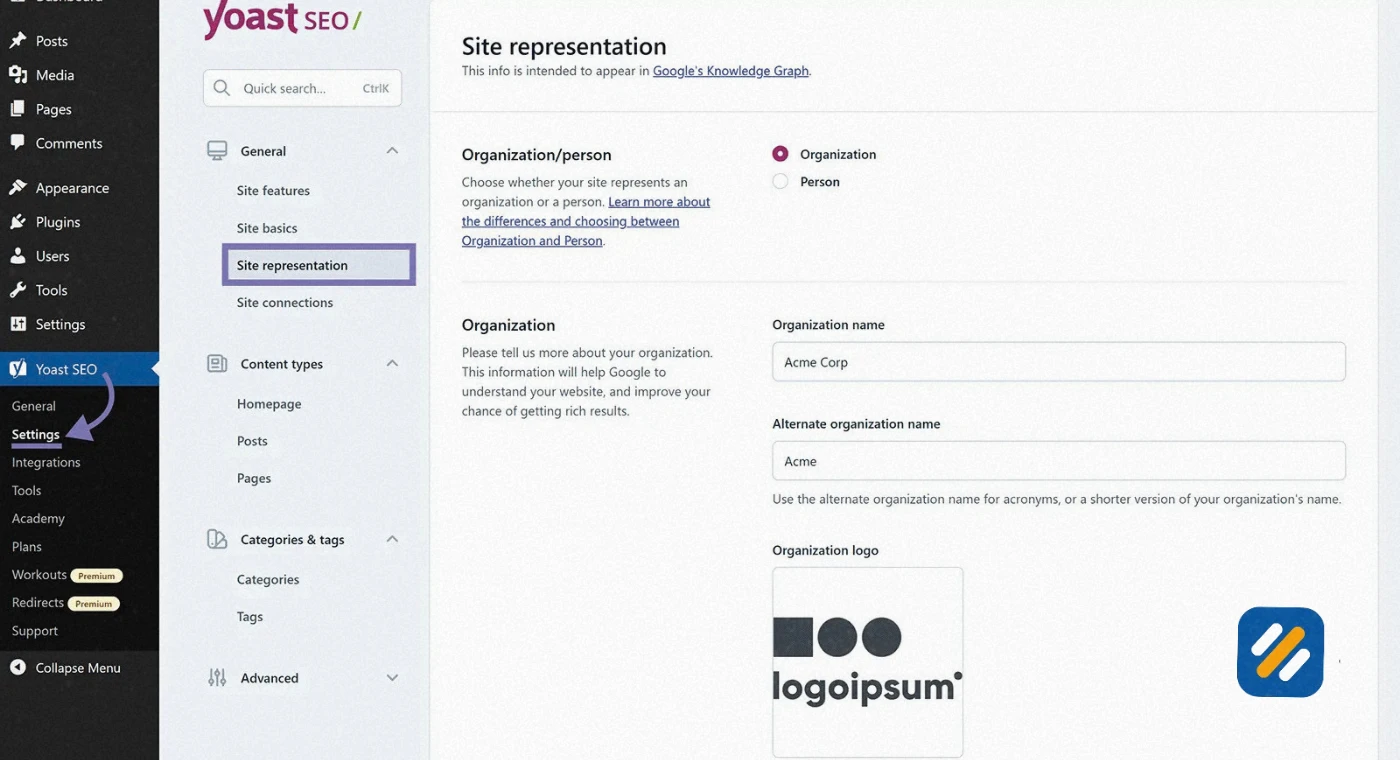
Go to Rank Math then Titles and Meta in your dashboard. Under the General tab, confirm whether your website represents a Person or an Organization. For SEOWithRoman.com, select Person and enter your full name. This sets the global schema that appears on your homepage and About page automatically.
Step 3: Set the schema type for each post type.
Still in Titles and Meta, click on Posts. Find the Schema Type dropdown and select Article. This tells Rank Math to automatically add Article schema markup to every blog post you publish without any manual action per post.
Step 4: Add FAQ schema to individual posts.
When editing a blog post that contains a FAQ section, scroll down to the Rank Math panel below the editor. Click on Schema. Click Add New Schema and select FAQ. Enter each question and answer manually. Rank Math generates the JSON-LD code automatically and injects it into the page.
Step 5: Validate your schema before publishing.
Copy your page URL and paste it into Google's Rich Results Test at search.google.com/test/rich-results. The tool will show you exactly which schema types were detected, whether they are valid, and whether your page is eligible for rich results. Fix any errors before the post goes live.
Step 6: Monitor schema health in Google Search Console.
After publishing, open Google Search Console and go to the Enhancements section in the left sidebar. This shows you a report for every schema type Google has detected across your site, including any errors or warnings that need attention.
8 Schema Markup Best Practices That Most Beginners Miss
Following these practices separates correctly implemented schema from schema that either gets ignored by Google or triggers a manual action:
Only mark up what is actually visible on the page. Google is explicit about this. If your schema markup says a product has a 4.8 star rating but there are no reviews visible on the page, Google will flag this as misleading structured data. Every piece of information in your schema must correspond to content a real user can see.
Use the most specific schema type available. If you are marking up a restaurant, use Restaurant schema rather than LocalBusiness. If you are marking up a hotel, use Hotel rather than LodgingBusiness. The more specific the type, the more accurate information Google can surface in rich results.
Do not mark up your own business reviews with review schema. Google explicitly prohibits using review schema to display testimonials you control about your own business. This is the most common schema markup mistake I see on small business websites. Review schema is for third-party editorial reviews, not self-managed testimonials.
Keep schema data consistent with other listings. If your Organization schema says your phone number is one number but your Google Business Profile shows a different number, Google detects the inconsistency and may ignore both. Keep all business details identical across your website schema, GBP, and any directory listings.
Fill in recommended properties, not just required ones. Most schema types have required properties and recommended properties. Required properties prevent errors. Recommended properties unlock additional rich result features. For example, Article schema requires headline and image but recommends datePublished, dateModified, and author. Adding all recommended properties gives your pages the best possible chance of appearing as fully featured rich results.
9 How to Test and Validate Your Schema Markup
Testing schema markup before and after publishing is not optional. Invalid schema is ignored by Google entirely. Here are the three tools to use:
Google Rich Results Test at search.google.com/test/rich-results is the primary validation tool. Enter a URL or paste raw JSON-LD code directly. It tells you which schema types were detected, which are valid for rich results, and lists any errors or warnings with specific line references so you can fix them precisely.
Google Search Console Enhancements Report shows the schema health of your entire website over time. It tracks errors, warnings, and valid items across every schema type Google has detected. Any spike in errors here means a recent publishing change or plugin update broke your schema.
Schema Markup Validator at validator.schema.org is the official Schema.org validation tool. Unlike the Rich Results Test which checks Google-specific eligibility, the Schema Markup Validator checks whether your markup is syntactically correct against the Schema.org
10 3 Expert Tips for Schema Markup Implementation
Tip 1: Add FAQ Schema to Every Article That Has a Questions Section
FAQ schema is one of the easiest rich results to earn and one of the highest impact for click through rates. A page with FAQ schema can appear in search results with two to five additional lines of expanded questions and answers below the main listing. This doubles the visual space your result takes up on the page and dramatically reduces how many users even see the competing results below yours.
Tip 2: Audit Your Schema Every Time You Update a Plugin or Theme
The most common cause of broken schema markup on WordPress websites is a plugin update, not a mistake in the original implementation. Rank Math, Yoast, and Schema Pro all update regularly. Occasionally an update changes how schema is generated or introduces a conflict with another plugin. Check your Google Search Console Enhancements report the week after any major plugin update and fix any new errors immediately before they accumulate.
Tip 3: Use Person Schema on Your About Page to Strengthen E-E-A-T
Most beginners only add schema to product pages and blog posts. Your About page is one of the highest value schema opportunities on a personal brand website. Adding Person schema with your name, job title, professional credentials, social profiles, and a link to your LinkedIn profile gives Google explicit signals about your real-world expertise and identity. This directly supports your E-E-A-T signals and strengthens how Google evaluates the authorship of every article you publish under your name.
11 Conclusion
Schema markup is one of those technical SEO tasks that feels intimidating until you actually do it once. Then you realise it is straightforward, especially on WordPress where Rank Math handles most of it automatically.
The returns are real. Rich results earn more clicks at the same ranking position. FAQ schema doubles your search listing real estate. Person and Organization schema tell Google exactly who you are and what your website represents. All of these compound over time as your website builds authority.
Start with the basics. Add Article schema to every post. Add Organization or Person schema to your homepage. Add FAQ schema to any article with a questions section. Validate everything in the Rich Results Test before publishing.
Once those three are in place, work through the other schema types based on which pages on your site would benefit most from rich results. Every implementation is permanent. Every rich result earned is a competitive advantage that runs in the background while you focus on creating content.
Have a question about adding schema markup to your specific website? Drop a comment below and I will help you work out the right implementation.
Join 1,000+ business owners and bloggers who get one actionable SEO tip every week — straight to their inbox. Free forever.
Get Free Weekly Tips →