- A URL stands for Uniform Resource Locator and is the unique address of every page, image, or file on the internet
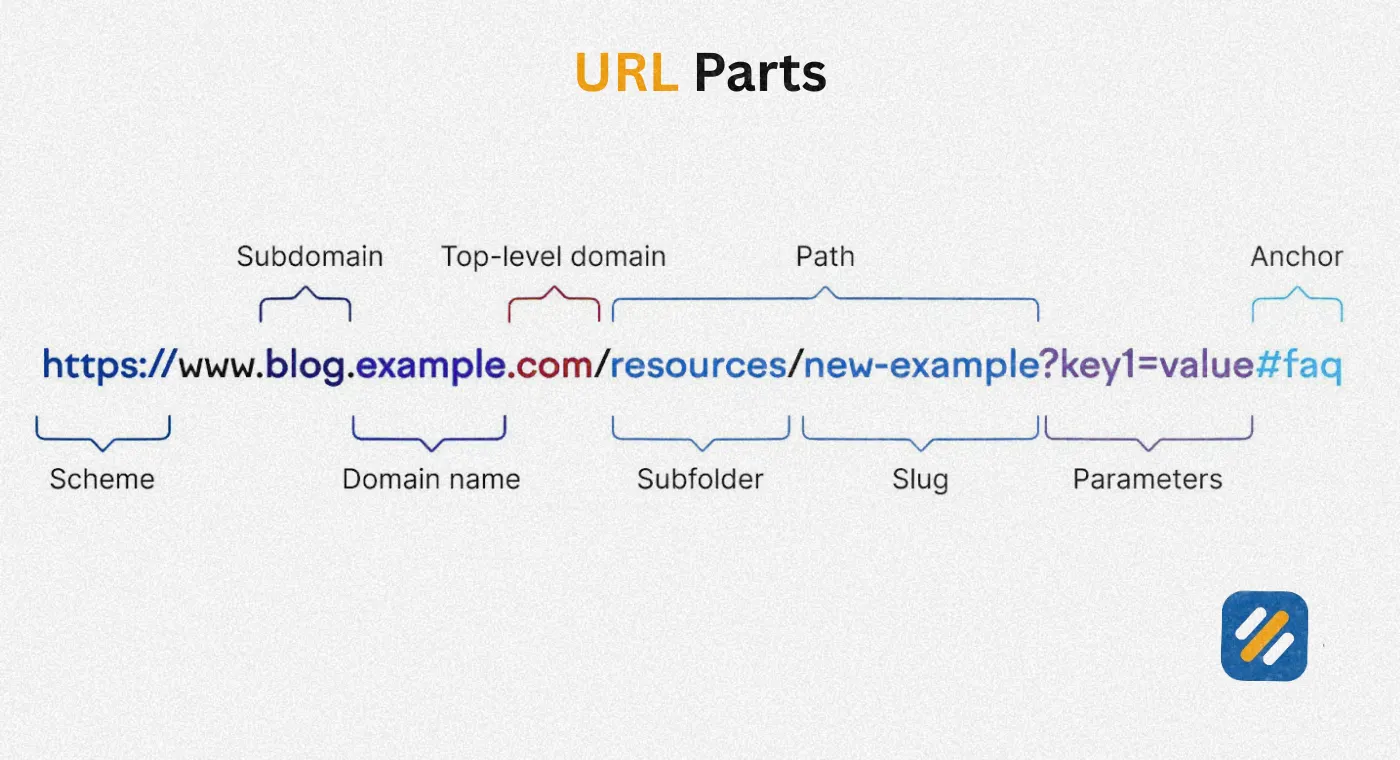
- Every URL has up to seven components: scheme, subdomain, domain name, top-level domain, path, parameters, and anchor
- There are four main types of URLs: absolute, relative, canonical, and vanity
- SEO-friendly URLs are short, descriptive, use hyphens, contain lowercase letters, and always use HTTPS
- A poorly structured URL can confuse both users and Google, directly impacting your rankings and click through rates
1 What Is a URL and Why Does Every Website Need One
Every time you visit a webpage, you are using a URL without thinking about it. But most website owners and beginners have never stopped to understand what it actually is, what each part does, or why getting it right matters so much for SEO.
A URL stands for Uniform Resource Locator. It is the complete web address that tells your browser exactly where to find a specific page, image, video, or file on the internet. Think of it as a postal address for digital content. Just as a physical address tells a delivery driver which building, street, floor, and apartment to go to, a URL tells a browser which server, website, folder, and page to retrieve.
Every single page on the internet has its own unique URL. Without URLs, the web as we know it would not function. There would be no way to share links, no way for search engines to index individual pages, and no way for browsers to know what content to load.
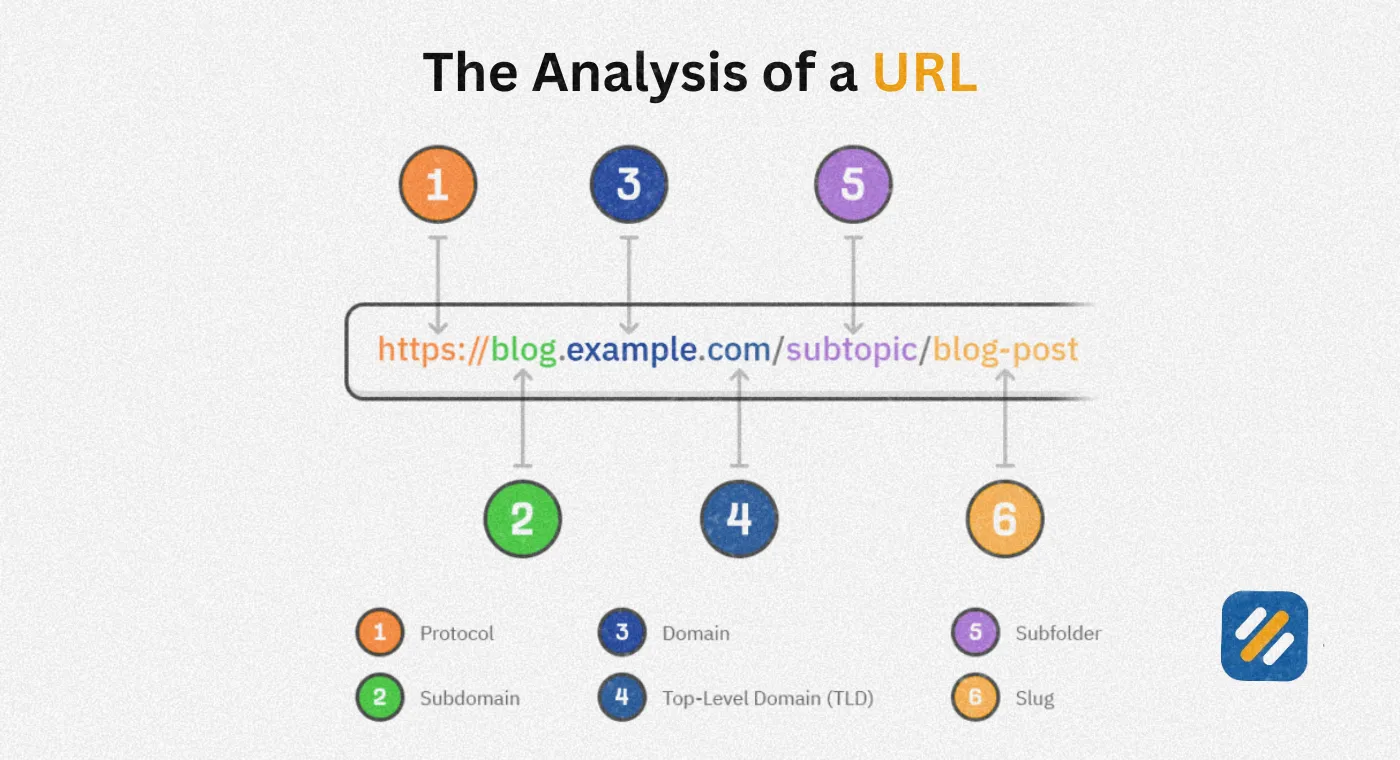
Here is a real example of a complete URL broken into plain language:
https://www.seowithroman.com/blog/professional-seo-technical-audit-service
- https is the scheme or protocol
- www is the subdomain
- seowithroman is the domain name
- .com is the top-level domain
- /blog/ is the subfolder
- /professional-seo-technical-audit-service
Every part of that address has a specific job. Understanding each one helps you make better decisions about how you structure your website.
2 The Complete URL Structure Explained | Every Component Broken Down
Most beginners look at a URL and see one long string of text. An SEO specialist looks at the same URL and sees seven distinct components each carrying specific meaning for both users and search engines.
Here is every URL component explained in plain language:
Scheme (Protocol)
The scheme is the very first part of a URL and tells the browser which communication protocol to use when requesting the page. The two you will encounter on virtually every website are HTTP and HTTPS.
HTTP stands for Hypertext Transfer Protocol. It is the original protocol that powers the web. The problem is that HTTP transmits data in plain text, meaning anyone intercepting the connection can read it.
HTTPS stands for Hypertext Transfer Protocol Secure. It adds an SSL encryption layer that protects data transmitted between the user's browser and the website's server. Google confirmed HTTPS as an official ranking signal in 2014 and modern browsers now display a "Not Secure" warning on any HTTP website.
For any website built in 2026, HTTPS is not optional. It is the baseline.
Subdomain
A subdomain appears before the main domain name and is separated from it by a dot. The most common subdomain is "www" which stands for World Wide Web. However subdomains are also used to separate distinct sections of a website.
Common subdomain examples
- blog.example.com for a blog hosted separately from the main site
- help.example.com for a customer support centre
- shop.example.com for an ecommerce store
- fr.example.com for a French language version of the site
For most small business websites and personal blogs, you will use www or no subdomain at all. Subdomains become important when you are building large multi-section websites or targeting different international markets.
Domain Name
The domain name is the core identity of your website. In seowithroman.com the domain name is "seowithroman." It is the part humans recognise and remember. It should be short, brandable, easy to spell, and relevant to what the website covers.
Domain names are registered through registrars like Namecheap or GoDaddy. Once registered, a domain name is exclusively yours for as long as you renew it.
Top-Level Domain
The top-level domain, commonly called TLD, is the extension that follows the domain name. It is the final segment of the domain portion of a URL.
| TLD | Typical Use | Example |
|---|---|---|
| .com | Commercial websites, most widely trusted | seowithroman.com |
| .org | Non-profit organisations and communities | wikipedia.org |
| .net | Network and internet service providers | speedtest.net |
| .gov | Government departments and agencies | irs.gov |
| .edu | Educational institutions | harvard.edu |
| .co.uk | UK-based businesses | bbc.co.uk |
| .io | Tech startups and SaaS tools | notion.io |
| .ai | Artificial intelligence companies | anthropic.ai |
For a personal brand blog targeting US and UK audiences, .com remains the most trusted and universally recognised TLD. It signals credibility before a visitor has even clicked your link.
URL Path
The path is everything that appears after the top-level domain. It tells both users and search engines where a specific page sits within the structure of your website.
A path can include one or more subfolders followed by a URL slug
A subfolder organises your content into logical sections.
For example in seowithroman.com/keyword-research/ the subfolder is keyword-research. This tells Google and users that everything inside this section is related to keyword research.
A URL slug is the final part of the path that identifies the specific page. In seowithroman.com/blog/how-to-do-keyword-research-for-free the slug is how-to-do-keyword-research-for-free.
A good slug is short, descriptive, contains the target keyword, uses hyphens between words, and avoids numbers, dates, or stop words that will make it outdated or unnecessarily long.
URL Parameters
Parameters are the optional additions to a URL that appear after a question mark and modify what the page displays without creating an entirely new page. They consist of a key and a value separated by an equals sign.
Example: seowithroman.com/articles?category=technical-seo
In this example "category" is the key and "technical-seo" is the value. Multiple parameters are separated by an ampersand.
Parameters are commonly used for:
- Filtering and sorting ecommerce products
- Tracking marketing campaign sources in analytics
- Paginating long content archives
- Running A/B tests on page variations
The SEO challenge with parameters is that they can create multiple URLs showing identical or near-identical content, which Google may treat as duplicate content. Always use canonical tags to specify the primary version of parameterised pages.
Anchor or Fragment Identifier
The anchor, also called a fragment identifier, is the very last part of a URL and begins with a hash symbol. It does not send users to a different page. Instead it scrolls the browser to a specific section within the same page.
Example: seowithroman.com/what-is-seo#technical-seo-section
When a user clicks this link they land on the what-is-seo page but the browser automatically scrolls to the section tagged with the anchor "technical-seo-section."
Anchors are extremely useful for long-form content. Adding a table of contents at the top of a long article with anchor links to each section significantly improves user experience and reduces bounce rate.
Full URL Structure at a Glance
| URL Component | Example | Purpose |
|---|---|---|
| Scheme | https:// | Defines the communication protocol |
| Subdomain | www. | Identifies a sub-section of the website |
| Domain name | seowithroman | Core brand identity of the website |
| Top-level domain | .com | Classifies website type or location |
| Subfolder | /keyword-research/ | Groups related content into categories |
| URL slug | /free-keyword-research-guide | Identifies the specific page |
| Parameters | ?source=newsletter | Modifies page content or tracks data |
| Anchor | #step-by-step | Jumps to a specific section within the page |
3 Types of URLs: What Each One Does and When to Use It
Not all URLs serve the same purpose. Understanding the four main URL types helps you make better decisions about how your website is structured, how content is linked, and how Google indexes your pages.
Absolute URLs
An absolute URL is a complete web address that includes every component needed to locate a resource: the scheme, domain, and full path. It works from any location on the internet because it contains the full address with no assumptions.
Example: https://www.seowithroman.com/blog/how-to-do-keyword-research-for-free
Absolute URLs are used for:
- External links pointing to other websites
- Links in email newsletters where there is no base domain context
- Social media shares
- Canonical tags that specify the preferred version of a page
- Sitemap entries submitted to Google Search Console
Relative URLs
A relative URL only includes the path portion of the address, leaving out the scheme and domain. The browser fills in the missing parts based on the current page's location.
Example: blog/how-to-write-a-perfect-seo-title-tag-with-real-examples
Relative URLs are primarily used for internal links within a website. They are shorter, easier to manage during site migrations, and update automatically when the domain changes. However if a relative URL is accidentally shared outside the website context it will not work because there is no domain to attach it to.
Canonical URLs
A canonical URL is the version of a page you want Google to index and rank when multiple versions of that page exist. You specify it using a canonical tag placed in the page's HTML head section.
Example: A page accessible at both https://www.seowithroman.com/blog/what-is-alt-text and https://www.seowithroman.com/blog/what-is-alt-text?ref=newsletter should have a canonical tag pointing to the first version so Google knows which one to index.
Canonical URLs are essential for:
- Ecommerce sites with filtered product pages creating duplicate URLs
- Pages with tracking parameters creating multiple versions
- Syndicated content published on multiple domains
- HTTP and HTTPS versions of the same page coexisting
Without canonical tags on duplicate content, Google has to guess which version to rank. It does not always guess correctly.
Vanity URLs
A vanity URL is a short, custom, branded web address designed to be easy to remember and share. It typically redirects to a longer destination URL.
Example: seowithroman.com/free-guide redirects to seowithroman.com/keyword-research/complete-beginners-guide-to-keyword-research-for-free
Vanity URLs are used in:
- Print advertising where long URLs cannot be typed easily
- Podcast sponsorships where listeners hear the URL verbally
- Social media bios where brevity matters
- Business cards and offline marketing materials
They do not carry direct SEO value but they improve click through rates and brand recall in marketing campaigns significantly.
4 What Makes a URL SEO-Friendly | The Complete Checklist
Your URL is one of the first things both Google and a human searcher see when your page appears in search results. A clean, descriptive URL signals relevance before anyone has clicked. A messy, auto-generated URL does the opposite.
Here is what every SEO-friendly URL must have:
HTTPS protocol: This is non-negotiable in 2026. Google confirmed HTTPS as a ranking signal and Chrome flags HTTP sites as "Not Secure." Any website without SSL is at a trust disadvantage before a visitor even reads the first sentence.
Target keyword in the slug: Google has confirmed that words in the URL help it understand a page's topic. Include your primary keyword in the slug naturally. If you are writing about keyword research, the slug should contain "keyword-research" not "post-142."
Hyphens between words, not underscores: Google treats hyphens as word separators. It treats underscores as joiners, meaning "keyword_research" reads to Google as "keywordresearch" rather than two separate words. Always use hyphens.
Lowercase letters only: URLs are technically case-sensitive on many servers. "seowithroman.com/About" and "seowithroman.com/about" can be treated as two different pages, creating duplicate content. Use only lowercase across every URL on your site.
Short and descriptive: The ideal URL slug is three to five words that describe exactly what the page covers. Avoid dates, numbers, filler words like "the" or "a," and auto-generated ID strings like "?p=4782."
No special characters or spaces: Spaces in URLs get encoded as %20 which looks messy and confusing. Special characters like #, &, and % have specific functions in URLs and should not appear in slugs.
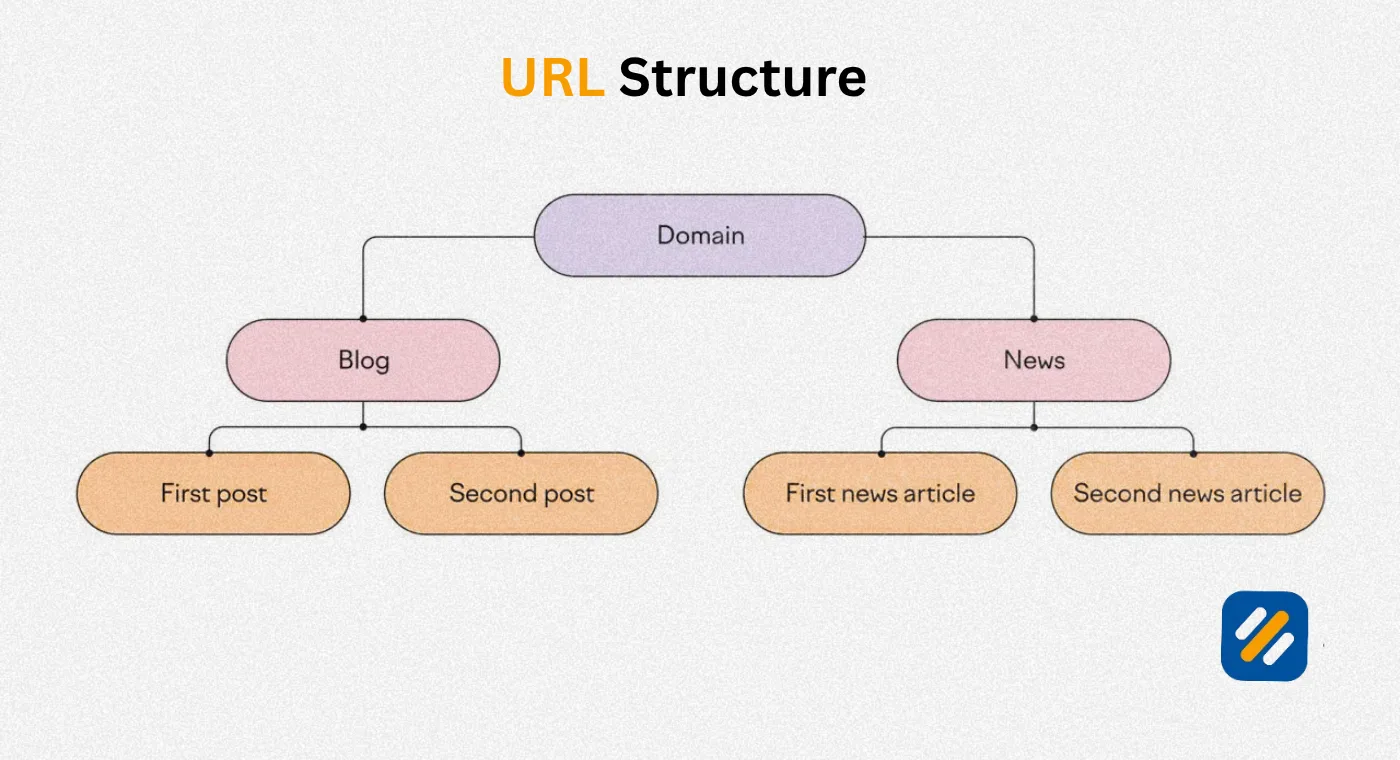
Logical folder structure: Subfolders should reflect your site's content hierarchy. seowithroman.com/technical-seo/what-is-a-404-error is clearer to both users and Google than seowithroman.com/blog/2024/03/12/404.
5 URL Best Practices Compared | Good vs Bad Examples
| Page Type | Poor URL | SEO-Friendly URL | Why It Matters |
|---|---|---|---|
| Blog article | seowithroman.com/?p=142 | seowithroman.com/seo-basics/what-is-seo | Keyword present, readable, categorised |
| Product page | shop.com/item?id=4892&cat=shoes | shop.com/shoes/running-shoes-men | Descriptive, no unnecessary parameters |
| Category page | site.com/cat/23 | site.com/keyword-research/ | Humans and Google understand instantly |
| About page | site.com/page?id=2 | site.com/about/ | Clean, short, universally expected |
| Contact page | site.com/contact-us-today-2024 | site.com/contact/ | No dates, no unnecessary words |
| Location page | site.com/loc?city=london&type=seo | site.com/seo-services-london/ | Keyword rich, parameter free |
| Tag page | site.com/tag/seo+tips+2026 | site.com/topics/seo-tips/ | No encoded spaces, organised structure |
6 How URL Structure Affects SEO and Google Indexing
Most beginners treat URLs as an afterthought, something WordPress generates automatically when you hit publish. This is one of the most damaging SEO mistakes a new website can make.
Your URL structure affects SEO in five direct ways:
Keyword relevance signals. Google uses words in the URL to help determine what a page is about. A URL containing your target keyword gives Google an additional topical signal beyond the title tag and body content. It is a small signal individually but it reinforces all your other on-page optimisation.
Click through rate from search results. Google displays your URL in search results below your title tag. A clean, descriptive URL tells the searcher exactly what they are about to click. A URL like "site.com/?p=3847" tells them nothing and reduces the likelihood of a click.
Crawl efficiency. A logical URL structure with clear subfolders helps Googlebot understand the hierarchy of your website and crawl it more efficiently. Flat URL structures with no organisation force Google to work harder to understand which pages are related and which are most important.
Duplicate content risk. Poorly managed parameters, inconsistent HTTP and HTTPS versions, and trailing slash inconsistencies all create duplicate URL problems where Google has multiple versions of the same page to choose from. Without canonical tags, Google may index the wrong version or split ranking signals across multiple URLs.
Link equity distribution. Internal links use URLs. If your internal link structure points to multiple URL variations of the same page, link equity gets split. Consistent, canonical URLs ensure all internal link value flows to one definitive version of each page.
7 How to Check and Fix URL Issues on Your WordPress Website
On a WordPress website, URL problems are extremely common because the default permalink structure is not SEO-friendly. Here is how to identify and fix the most common issues:
Fix your permalink structure first. In WordPress go to Settings then Permalinks. Select "Post name" as your permalink structure. This gives you clean URLs like seowithroman.com/what-is-seo instead of seowithroman.com/?p=1. Do this before publishing your first article. Changing it after articles are published requires setting up redirects for every existing URL.
Check for duplicate URLs in Google Search Console. Open GSC and go to Indexing then Pages. Look for "Duplicate without user-selected canonical" and "Duplicate, Google chose different canonical than user." Both indicate URL canonicalisation problems that need fixing.
Use Rank Math to set canonical URLs. On every page in WordPress, Rank Math's Advanced tab shows the canonical URL field. Verify it matches the URL you want Google to index. For pages with parameters, make sure the canonical points to the clean version without parameters.
Audit your URL slugs before publishing. When you create a new post in WordPress, the slug auto-generates from your title. A title like "The Complete Beginner's Guide to Keyword Research in 2026" generates a slug like "the-complete-beginners-guide-to-keyword-research-in-2026" which is too long. Manually shorten it to "keyword-research-beginners-guide" before hitting publish.
Never change a live URL without setting up a 301 redirect. Changing a published URL breaks every internal and external link pointing to it and loses all accumulated ranking signals. If you must change a URL, immediately set up a 301 redirect from the old URL to the new one using the Redirection plugin.
8 URL Parameters and Canonical URLs | The Advanced SEO You Need to Know
This is the section most beginner URL guides skip entirely. Parameters and canonical URLs are where real technical SEO knowledge separates experienced specialists from beginners.
Understanding URL parameters in depth:
Parameters are added to URLs to pass information to the server or analytics platforms. They start with a question mark and consist of key-value pairs.
The four most common types of parameters and their SEO implications:
| Parameter Type | Example | SEO Risk | Recommended Fix |
|---|---|---|---|
| Tracking parameters | ?utm_source=newsletter | Low, Google usually ignores UTM params | Use canonical tag on target page |
| Filtering parameters | ?colour=blue&size=M | High, creates duplicate product pages | Canonical tag pointing to main category page |
| Sorting parameters | ?sort=price-low | Medium, different order, same content | Canonical tag or noindex on sorted pages |
| Pagination parameters | ?page=2 | Medium, paginated content indexing issues | Use rel next and prev or canonical to page 1 |
Canonical URLs in practice:
A canonical tag is placed in the HTML head section of a page and looks like this: link rel="canonical" href="https://www.seowithroman.com/blog/how-to-do-keyword-research-for-free".
In WordPress with Rank Math installed, you never need to touch HTML manually. Rank Math automatically sets canonical tags based on your permalink settings and allows you to override them on any individual page.
The three situations where you must manually check and set canonical URLs:
First, any page that is accessible via both HTTP and HTTPS. The canonical must point to the HTTPS version.
Second, any page accessible both with and without a trailing slash. seowithroman.com/about and seowithroman.com/about/ must canonicalise to the same version consistently across every page.
Third, any ecommerce or filtered page that creates parameter-based URL variations showing the same or similar content.
9 3 Expert Tips for URL Structure That Most Guides Never Mention
Tip 1: Set Your Permalink Structure Before You Publish a Single Article
Changing your URL structure after publishing forces you to redirect every existing page. WordPress makes this easy to delay and easy to forget. Go to Settings then Permalinks on day one, select Post name, and save. Every URL you publish from that point will be clean, readable, and SEO-friendly from the start. This single setting change takes thirty seconds and saves you hours of redirect management later.
Tip 2: Keep Slugs Evergreen by Removing Dates and Numbers
A slug like "best-seo-tools-2024" becomes outdated the moment 2025 arrives. Either you update the article and the title reflects a new year while the URL says 2024, which looks inconsistent, or you change the URL and need a redirect. Write slugs that will be accurate and relevant in 2030: "best-seo-tools" works forever. The same applies to numbered lists. "7-seo-tips" becomes misleading if you add two more tips in an update.
Tip 3: Use Google Search Console to Catch URL Problems Before They Compound
Most URL issues on small business websites were never intentionally created. They accumulate quietly through plugin updates, theme changes, and WordPress default settings. Check your GSC Pages report monthly. Look specifically for "Duplicate without user-selected canonical," "Crawled but not indexed," and "Not found 404" entries. Catching these early prevents months of ranking signals being split across duplicate URLs or lost entirely to broken pages.
10 Conclusion
A URL is far more than a web address. It is a ranking signal, a trust indicator, a user experience element, and a structural foundation for your entire website's SEO performance.
Get your URL structure right before you publish your first article and you will never have to deal with redirect management, duplicate content problems, or split link equity. Get it wrong and every article you publish is working against a structural disadvantage that grows harder to fix with every page you add.
The rules are simple. Use HTTPS. Keep slugs short and keyword rich. Use hyphens not underscores. Stay lowercase. Build logical subfolder categories. Set canonical tags on any page with duplicates. Check Google Search Console monthly.
Follow those seven rules consistently and your URL structure will never be the reason a well-written article fails to rank.
Have a question about your own URL structure or a specific URL problem you are trying to fix? Drop a comment below and I will personally help you work out the right solution.
Join 1,000+ business owners and bloggers who get one actionable SEO tip every week — straight to their inbox. Free forever.
Get Free Weekly Tips →