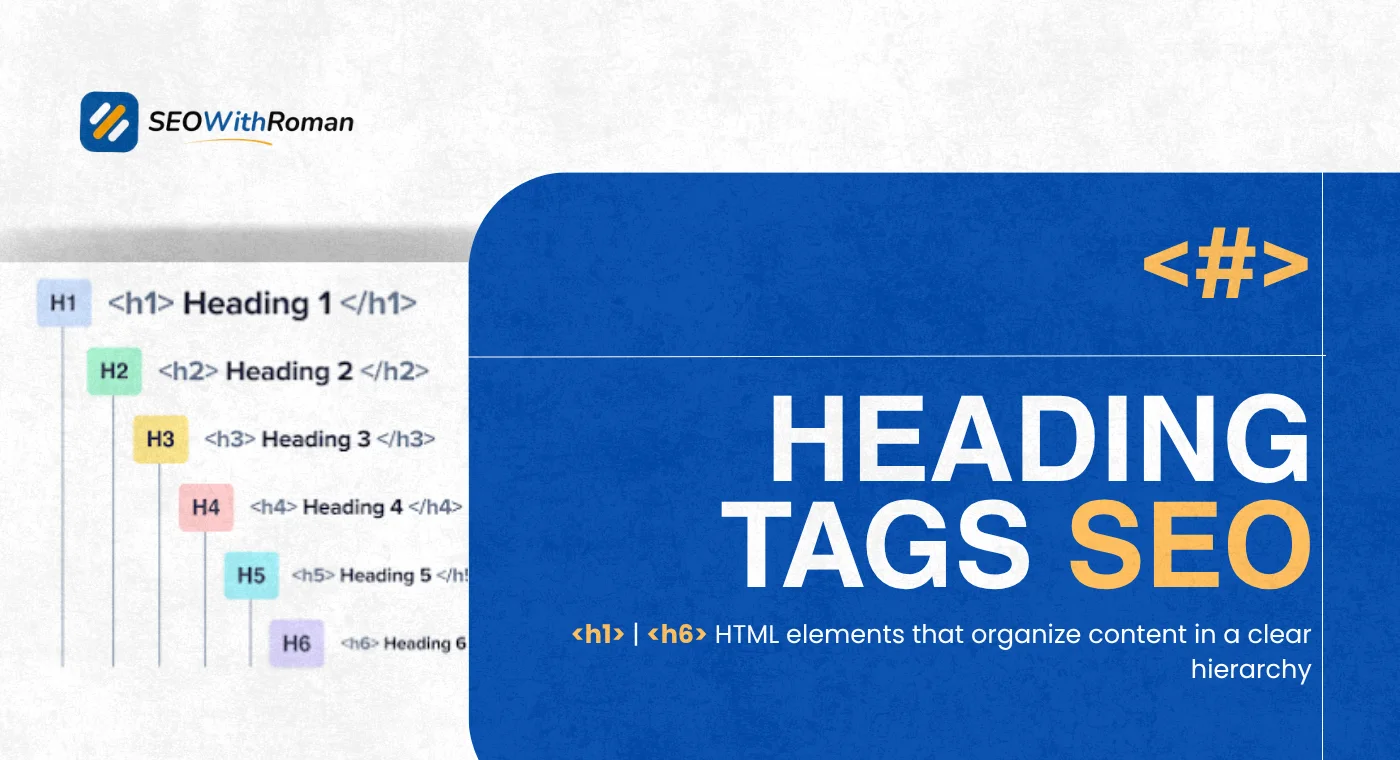
- Heading tags are HTML elements from H1 to H6 that structure your content for both readers and search engines
- Your H1 tag is the single most important on-page SEO element after your title tag and should contain your primary keyword
- Google uses heading tags to understand your page structure, identify subtopics, and extract content for featured snippets
- A logical heading hierarchy, H1 then H2 then H3, helps Google index individual sections of your content through passage ranking
- Most heading tag mistakes are easy to fix and have an immediate positive impact on both rankings and user experience
What Are Heading Tags and Why Every SEO Professional Takes Them Seriously
If you have ever read an article online and noticed the large title at the top, the bold section titles in the middle, and the smaller subheadings underneath, you have already experienced heading tags in action. You just did not know what they were called.
Heading tags are HTML elements that define the titles and subtitles within a webpage. They range from H1 at the top of the hierarchy all the way down to H6 at the bottom. In practice, most well-structured pages use H1, H2, and H3. H4 through H6 are used for deeply nested content that most beginner and intermediate websites simply do not need.
In raw HTML code, a heading tag looks like this:
H1 Your Main Page Title Here /H1
H2 Your First Main Section /H2
H3 A Subsection Under That Main Section /H3
On a live webpage, these tags render visually as progressively smaller and less prominent text. But their real power is invisible. They communicate the structure and hierarchy of your content to search engine crawlers before a human reader ever lands on the page.
In many years of doing on-page SEO audits across dozens of client websites, heading tag errors are consistently among the top five issues I find. Websites with genuinely good content failing to rank simply because their heading structure is broken, duplicated, or completely missing.
Getting heading tags right is one of the fastest, cheapest, and most impactful fixes available in all of on-page SEO.
1 The Complete Breakdown of Every Heading Tag From H1 to H6
Most guides tell you H1 is your main title and H2 and H3 are subheadings. That is accurate but incomplete. Here is what each heading tag actually does and when to use it:
| Heading Tag | Purpose | SEO Weight | When to Use It |
|---|---|---|---|
| H1 | Main page title, describes the entire page topic | Highest | Once per page, contains your primary keyword |
| H2 | Main sections of the article, direct subtopics of H1 | High | For every major section, include secondary keywords naturally |
| H3 | Subsections that fall under an H2 | Medium | When an H2 section has distinct sub-points worth separating |
| H4 | Sub-points under an H3 | Low | Deeply nested content like detailed technical documentation |
| H5 | Rarely used in standard content | Very low | Complex reference content or legal documents |
| H6 | Almost never used in standard content | Minimal | Only in highly structured technical or academic content |
The important thing to understand is that heading tags create a document outline. Think of it exactly like a book. The H1 is the book title. H2s are chapters. H3s are sections within chapters. H4s are sub-sections within those sections.
If your book had two titles or chapters that were not logically connected to the title, it would confuse every reader. Google works the same way.
2 How Heading Tags SEO Actually Works | What Google Does With Your Headings
This is the section that separates basic heading advice from genuinely useful understanding. Most guides tell you to use heading tags for SEO without explaining the mechanism behind why they work.
Here is what Google actually does with your heading tags:
Crawling and parsing. When Googlebot visits your page, it reads the HTML from top to bottom. Heading tags are treated as structural signals that define topic boundaries. When Google sees an H2, it understands a new major topic is beginning. When it sees an H3, it understands a subtopic of the previous H2 is starting.
Passage ranking. Since 2021, Google has been able to index and rank individual passages within a page rather than just the page as a whole. This means your H3 section about "how to fix a 404 error" within a larger technical SEO article can rank independently for that specific query. Properly structured heading tags make passage ranking significantly more effective because they define clear boundaries around each passage.
Featured snippet extraction. Google pulls featured snippets, those answer boxes at the top of search results, almost exclusively from content that is clearly structured under descriptive headings. If your H2 heading asks a question and your following paragraph answers it directly and concisely, you are structuring content exactly the way Google needs it to be for featured snippet selection.
People Also Ask boxes. The questions that appear in Google's People Also Ask boxes are heavily influenced by the question-format H2 and H3 headings on ranking pages. Writing headings as direct questions your audience asks is one of the most reliable ways to capture PAA positions.
Keyword relevance confirmation. When your target keyword appears in your H1 and at least one H2, it confirms to Google that your page is genuinely about that topic throughout its structure, not just in the body text. This consistency of keyword placement across the heading hierarchy strengthens topical relevance signals.
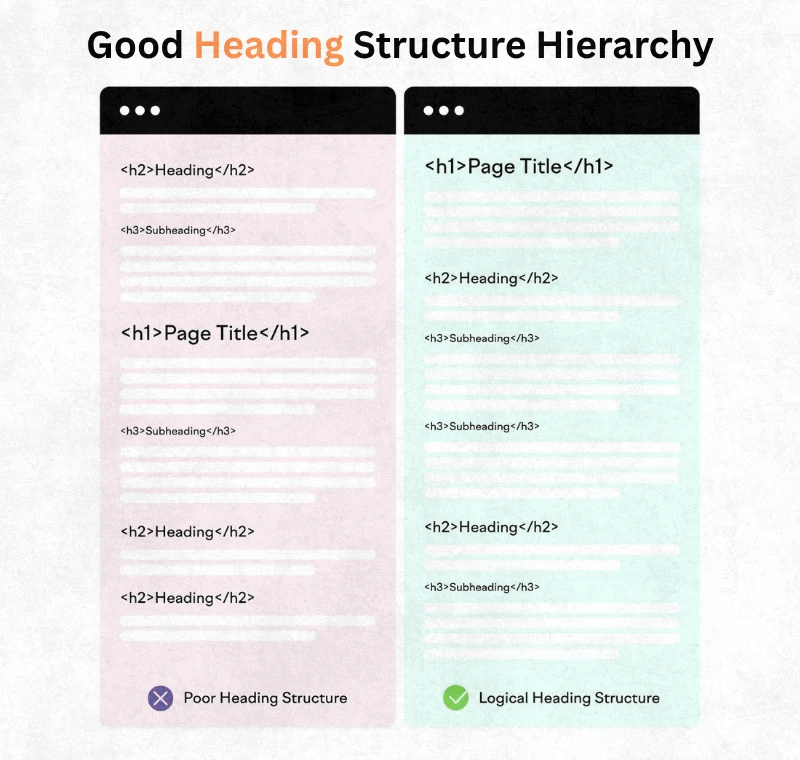
3 H1 Tag SEO | The Rules, the Examples, and the Mistakes That Kill Rankings
The H1 tag is the single most discussed heading tag in SEO and also the one with the most widespread errors. Here is everything you need to know about it.
The non-negotiable H1 rules:
Every page on your website needs exactly one H1 tag. Not zero. Not two. One.
A page with no H1 tag leaves Google without its clearest signal about what the page covers. A page with two H1 tags sends conflicting signals and forces Google to guess which one represents the page's true topic. Both situations hurt rankings.
Your H1 tag must contain your primary keyword. Not forced. Not stuffed. But present, ideally within the first few words.
Your H1 tag and your title tag do not need to be identical, but they should be very closely related. The title tag is what appears in search results. The H1 is what appears on the page. Google cross-references them. Significant inconsistency between the two confuses crawlers about what the page is actually about.
H1 tag SEO examples — good vs bad:
| Page Topic | Weak H1 | Strong H1 | Why It Works |
|---|---|---|---|
| Keyword research guide | Welcome to Our Blog | How to Do Keyword Research for Free Step by Step | Contains keyword, describes exactly what page covers |
| Technical SEO article | Introduction | What Is Technical SEO and Why It Matters for Beginners | Keyword first, audience clear, question format |
| Meta description guide | Meta Descriptions | How to Write Meta Descriptions That Get More Clicks | Action verb, benefit driven, keyword present |
| Internal linking guide | Learn About Links | What Is Internal Linking and How to Do It Correctly | Definition format, primary keyword, direct |
| WordPress SEO page | SEO Tips | Complete WordPress SEO Guide for Beginners in 2026 | Power word, keyword, audience specific, year |
The pattern is consistent across every strong H1 example. The primary keyword appears early. The heading describes exactly what the page delivers. The reader knows immediately whether they are in the right place.
4 How to Use H2 Tags Correctly for Maximum SEO Impact
If the H1 is the chapter title, your H2 tags are the chapter breakdown. Each H2 should represent a distinct major section of your content and together they should form a logical outline of the entire page.
Here is how to write H2 tags that work hard for your SEO:
Include your secondary keywords in H2 headings. Your primary keyword belongs in the H1. Your H2 headings are where secondary and semantically related keywords live. If your primary keyword is "heading tags SEO," your H2 tags might naturally include phrases like "how to use H1 H2 H3 tags for SEO," "SEO heading structure," and "header tags and SEO best practices." None of these are forced. They are the natural subheadings a comprehensive article on this topic would have.
Write H2 tags as direct answers to questions. Before writing any H2 heading, ask yourself what question this section answers. Then write the heading as either that question or as a direct statement of the answer. "How Google Uses Your Heading Tags" is a stronger H2 than "Google and Heading Tags" because it promises a specific piece of information and sets up the following content to deliver it.
Keep H2 headings under 60 characters where possible. Long headings become unwieldy in the table of contents, in featured snippets, and on mobile screens. Direct and specific beats long and comprehensive every time.
Every H2 should cover something new. Repeating the same information under different H2 headings is one of the patterns Google's quality systems detect as thin content. Each H2 section should introduce information that was not covered in the section before it.
5 How to Use H3 Tags | The Most Underused Tool in On-Page SEO
H3 tags are where most beginner websites either completely disappear or collapse into chaos. Either the page has no H3s at all, creating massive walls of text under single H2 headings, or H3s are used randomly with no logical relationship to their parent H2.
Done correctly, H3 tags are one of the most powerful structural tools available for both readability and passage ranking.
The correct relationship between H2 and H3:
Every H3 on your page must be a direct subtopic of the H2 that precedes it. It cannot relate to a different H2. It cannot introduce a brand new major topic. It is a zoom-in on the section the H2 introduced.
Here is a concrete example using this very article:
H2: How to Use H3 Tags Correctly
H3: The Correct Relationship Between H2 and H3
H3: When to Use H3 vs a New H2
H3: H3 Tags and Passage Ranking
Each H3 is a distinct aspect of the H2 topic. None of them could stand alone as a new H2 because they are not broad enough to be major sections. But each one is specific enough to deserve its own subheading rather than being buried in a paragraph.
When to use H3 instead of creating a new H2:
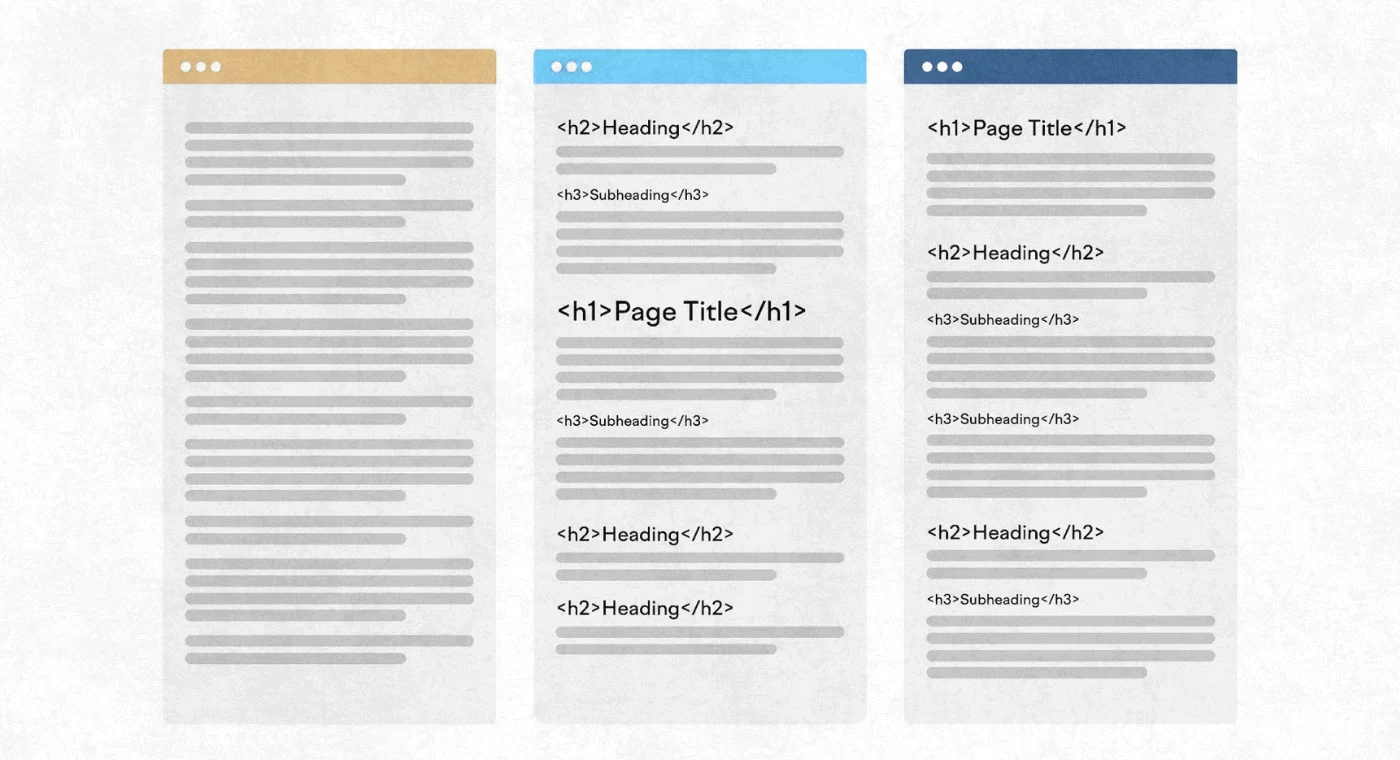
Use an H3 when the point you are making is a component or example of the current H2 section, not a completely new topic. If the information could logically be titled "Types of X," "Steps within X," or "Examples of X," it belongs under an H3, not a new H2.
6 Heading Tag SEO Best Practices: The Complete Checklist
Here is the complete heading tag SEO checklist I use when auditing client websites. Run every page on your site against this list before publishing:
| Best Practice | Correct Approach | Common Mistake to Avoid |
|---|---|---|
| H1 usage | One H1 per page containing primary keyword | Multiple H1s or missing H1 entirely |
| H1 content | Describes the entire page topic clearly | Generic titles like "Welcome" or "Home" |
| H2 structure | Each H2 covers a distinct major section | Repeating the same topic under different H2s |
| H2 keywords | Secondary keywords included naturally | Forcing exact match keywords unnaturally |
| H3 hierarchy | Every H3 is a subtopic of its parent H2 | H3s that introduce new unrelated topics |
| Heading order | H1 then H2 then H3, never skipping levels | Going from H1 directly to H3 skipping H2 |
| Keyword density | Primary keyword in H1 and one or two H2s | Repeating primary keyword in every heading |
| Question headings | Frame relevant headings as user questions | Writing all headings as bland label phrases |
| Heading length | Under 60 characters where possible | Long headings that get truncated in snippets |
| Unique headings | Every heading is unique across the page | Using the same heading text in multiple places |
| Accessibility | Headings create a logical screen reader flow | Using heading tags purely for visual styling |
| WordPress setup | Rank Math confirms H1 is present on every page | Publishing pages without checking heading structure |
7 How Heading Tags Affect Rankings | The Real Evidence
This is a question I get asked regularly by clients. Do heading tags actually affect Google rankings or are they just for readability?
The honest answer is both and the evidence supports it.
Google's own John Mueller has confirmed that heading tags help Google understand page structure and are useful for SEO. He has also clarified that H1 through H6 do not carry dramatically different weight from each other in terms of raw ranking power. What matters is the structure they create and the keywords they contain.
The real ranking impact of heading tags comes through four mechanisms:
Click through rate improvement. Pages with clear, logical heading structures have lower bounce rates and longer dwell times. Both are user behaviour signals that Google monitors as proxies for content quality. Better structure keeps readers on the page longer, which tells Google the content is satisfying the search intent.
Featured snippet eligibility. According to multiple studies including research from Ahrefs, pages that win featured snippets almost always have clearly structured headings that directly answer common questions. A heading formatted as a question followed by a concise answer is the exact format Google's featured snippet algorithm looks for.
Passage ranking opportunities. Each well-structured H2 and H3 section creates a separately rankable passage. A 1,500-word article with eight clear heading sections can effectively rank for eight different search queries rather than just the primary keyword.
Crawl efficiency. Heading tags reduce the work Google's crawlers have to do to understand your content. A clearly structured page communicates its topic hierarchy instantly. An unstructured wall of text forces Google to work harder to extract meaning, which reduces crawl efficiency and can lead to lower quality signals in the index.
8 How to Check and Fix Heading Tag Errors on Your WordPress Website
Finding heading tag errors on a WordPress website is straightforward using tools you either already have or can access for free.
Method 1: Rank Math SEO Plugin
If you are using Rank Math, open any post or page in the WordPress editor. In the Rank Math sidebar, click on the Basic SEO tab. Rank Math will flag if your H1 is missing, if you have multiple H1 tags, or if your primary keyword is absent from your headings. This is the fastest real-time check available on WordPress.
Method 2: Browser Inspection
On any live page, right-click and select View Page Source. Use Ctrl F to search for "h1" "h2" and "h3" to see exactly how many of each tag are present and what text they contain. This takes under two minutes and works on any website without any tool.
Method 3: Screaming Frog Free Version
Screaming Frog crawls up to 500 URLs and exports a complete heading tag report showing every page's H1 and H2 content, flagging missing tags, duplicate headings, and oversized headings. This is the most comprehensive free option for checking your entire website at once.
Common heading tag errors and how to fix them:
Missing H1 tag: Add an H1 that contains your primary keyword at the top of the page content. In WordPress, your post title automatically becomes the H1 in most themes.
Multiple H1 tags: Identify which H1 should remain and change all others to H2 or H3 depending on their importance in the content hierarchy.
Keyword missing from H1: Rewrite the H1 to include the primary keyword naturally without changing the page's overall meaning.
Skipped heading levels: If your page jumps from H1 to H3 with no H2, restructure the content so that an H2 is present between them.
Duplicate headings: If two sections use identical heading text, differentiate them by making each one more specific to the content it introduces.
9 Heading Tags vs Header Tags | The Difference Most Beginners Get Wrong
This confusion comes up constantly and it is worth addressing directly because mixing these two up leads to genuine technical SEO misunderstandings.
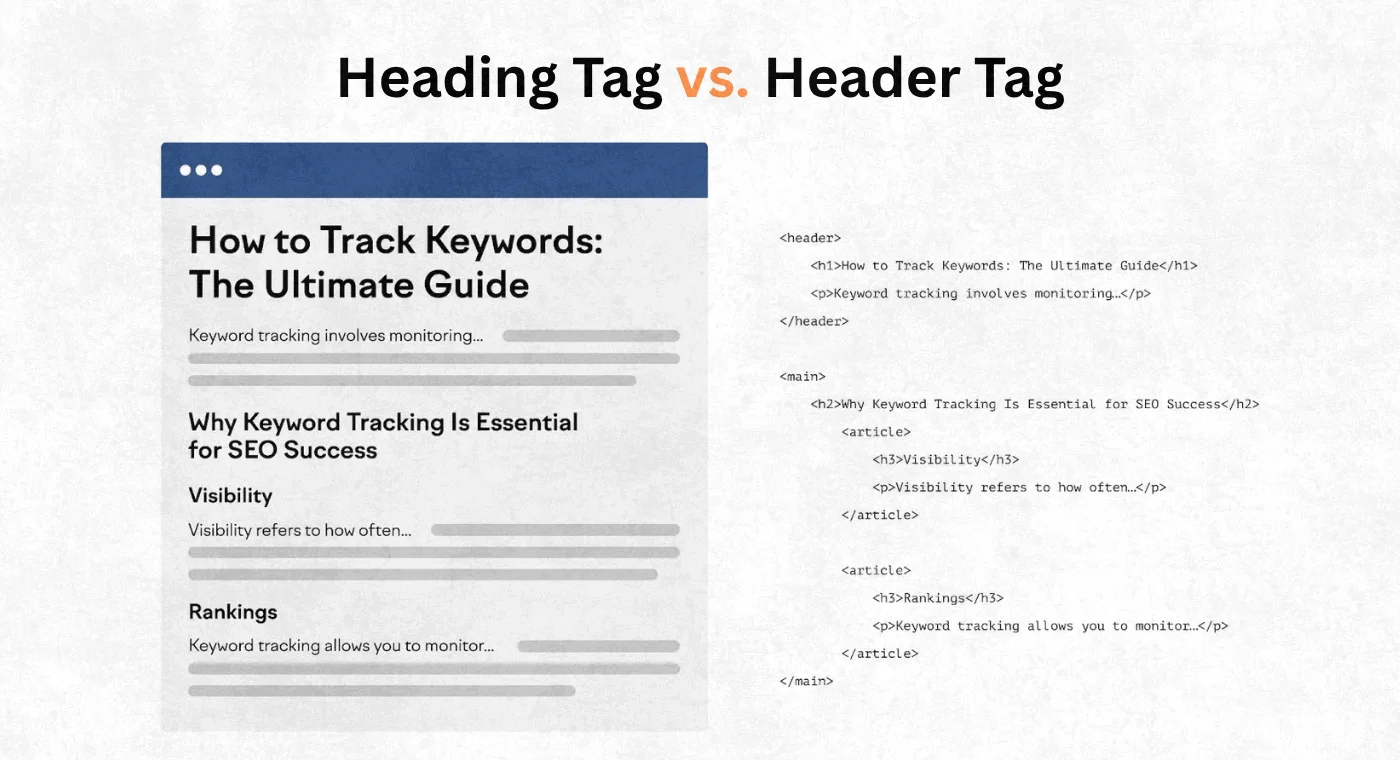
Heading tags and header tags are not the same thing. They are completely different HTML elements.
Heading tags are the H1 through H6 elements discussed throughout this article. They define the title hierarchy within your page content and are the elements that matter for content SEO.
The header tag is written in HTML as the word header inside angle brackets. It is a structural container element that wraps the top section of a webpage, typically holding your logo, navigation menu, and site-wide elements. It has nothing to do with content headings.
The confusion happens because people use "header" and "heading" interchangeably in conversation. But in HTML and in SEO they mean very different things. Optimising your "header tag" for SEO means something completely different from optimising your "heading tags."
For SEO purposes, heading tags, H1 through H6, are what you are optimising. The header container element requires no keyword optimisation because Google does not treat it as content.
3 Expert Tips for Heading Tags That Most SEO Guides Never Mention
These three tips come directly from my own client work and go beyond what the standard heading tag advice covers:
Expert Tip 1: Use Your H2 Headings to Build a Natural Table of Contents
Before writing a single word of body content, write out all your H2 headings first. Read them top to bottom as if they were a table of contents. If they tell a logical story, form a complete picture of the topic, and flow naturally from one to the next, your article structure is solid. If they feel random or repetitive, restructure them before you write anything else. Your headings are your content architecture. Fix the architecture first and the content writing becomes significantly easier and more focused.
Expert Tip 2: Frame Your Most Competitive H2 as a Direct Question
If you want to appear in People Also Ask boxes and Google's AI Overviews for specific queries, identify the one question your target audience asks most frequently about your topic and make it an H2 heading. Then answer it in the very first sentence of that section. This exact pattern, question heading followed by direct one sentence answer followed by supporting detail, is what Google's NLP systems are designed to extract for featured answers.
Expert Tip 3: Audit Competitors' Heading Structures Before Writing Your Own
Before finalising your heading structure for any article, open the top three ranking pages for your target keyword and look only at their H2 and H3 headings. Note which topics every competitor covers. Then find the one or two topics none of them cover in depth. Build your article to match the comprehensive coverage competitors provide, then add the angle they all missed. This single approach has generated first-page rankings for client articles going against established competitors with significantly higher domain authority.
10 Conclusion
Heading tags are not a minor technical detail. They are the architecture your entire page is built on. Get them right and you give Google a clear, efficient map of your content. Get them wrong and even well-written, well-researched articles can fail to rank simply because Google cannot efficiently extract their structure and meaning.
The rules are not complicated. One H1 with your primary keyword. H2s for major sections with secondary keywords placed naturally. H3s for subsections that belong under their parent H2. A logical hierarchy that never skips levels. Question-format headings where your audience's real questions are being answered.
These are not advanced tactics. They are SEO standards that every page on your website should meet before it goes live.
Open your most important page right now and check whether it has exactly one H1. That one check takes thirty seconds and is the starting point for fixing every other heading tag issue that follows.
Have a question about your heading structure or a specific heading tag problem on your website? Drop it in the comments and I will answer it personally.
Join 1,000+ business owners and bloggers who get one actionable SEO tip every week — straight to their inbox. Free forever.
Get Free Weekly Tips →