- A content calendar is a planning system that shows what content you will publish, when, where, and who is responsible for it
- Without a content calendar, most bloggers and small businesses publish inconsistently, which directly damages SEO rankings and audience trust
- A content calendar covers every format including blog posts, social media, email newsletters, and video
- The best content calendar for a solo blogger is a free Google Sheet. The best for a team is Notion or Asana
- A content calendar is not just a schedule. It is the operational foundation of your entire content marketing strategy
1 What Is a Content Calendar and Why Every Content Creator Needs One
If you have ever sat down to write a blog post and spent more time figuring out what to write than actually writing it, a content calendar is the solution to that exact problem.
A content calendar, also called an editorial calendar, is a planning document that shows you what content you will create, when it will be published, where it will go live, and who is responsible for each piece. It takes the chaos out of content creation and replaces it with a system that runs predictably every week.
Think of it like a production schedule for a newspaper. The editorial team does not sit down on Monday morning and wonder what stories to cover. Every article, column, and feature has already been planned, assigned, and scheduled. A content calendar does the same thing for your blog, social media, email list, and YouTube channel.
The difference between bloggers who grow consistently and bloggers who publish sporadically and then disappear for three weeks is almost always the presence or absence of a content calendar. Google rewards consistent publishing. Your audience rewards consistent publishing. A content calendar is what makes consistency possible.
In my experience managing SEO content for multiple client websites simultaneously, a content calendar is the single tool that separates reactive content creation from strategic content creation. Without one, you are always behind. With one, you are always a week ahead.
2 Content Calendar vs Editorial Calendar | Is There Actually a Difference
You will hear both terms used interchangeably across the marketing industry, but there is a subtle difference worth understanding before you build yours.
An editorial calendar is the older term, borrowed from print journalism and magazine publishing. It traditionally focuses on long-form content like articles, features, and opinion pieces. It is about the content itself, what topic it covers, who writes it, and when it publishes.
A content calendar is the modern, broader evolution of the editorial calendar. It covers every channel and every format simultaneously, blog posts, social media posts, email campaigns, video scripts, podcast episodes, and paid ad copy, all in one unified view.
| Term | Origin | Scope | Best For |
|---|---|---|---|
| Editorial Calendar | Print journalism | Long-form written content only | Blogs and publications |
| Content Calendar | Digital marketing | All formats and all channels | Full content marketing strategy |
| Social Media Calendar | Social media marketing | Social posts only | Social media managers |
| Content Marketing Calendar | Content strategy | Campaigns tied to business goals | Marketing teams |
| Blog Content Calendar | Blogging | Blog articles only | Solo bloggers and small sites |
| Content Publishing Schedule | Operations | Dates and deadlines only | Production-focused teams |
For a personal brand blog like SEOWithRoman.com, a content calendar that covers both blog articles and LinkedIn posts in one place is more efficient than maintaining separate documents for each channel.

3 Why a Content Calendar Is Not Optional for SEO Success
Most SEO guides talk about keyword research, on-page optimisation, and backlinks. Very few mention the operational system that makes all of those tactics actually work at scale. That system is the content calendar.
Here is how a content calendar directly affects your SEO performance
Consistency builds topical authority faster: Google rewards websites that publish regularly on a specific topic. A site that publishes four SEO articles per week for three months builds topical authority in the SEO niche faster than a site that publishes randomly. A content calendar is what enforces that consistency.
Planning prevents content gaps: When you plan content one month in advance, you can see immediately if you have published ten articles in one category and zero in another. Content gaps hurt your topical authority. A content calendar makes them visible before they become a ranking problem.
Keyword research happens at the right time: Without a calendar, most bloggers do keyword research right before they start writing. This is too late. Keyword research should happen during the planning phase, weeks before you write. A content calendar creates that separation and improves keyword selection across your entire site.
Internal linking improves naturally: When you can see your upcoming articles in advance, you can plan internal links between them before either article is published. This is a significant on-page SEO advantage that reactive content creators never get to use.
Content distribution becomes systematic: A well-built content calendar includes not just publication dates but also distribution tasks, such as sharing the article on LinkedIn on Tuesday, sending it to your email list on Thursday, and repurposing it as a social post the following week.
4 What to Include in a Content Calendar | Every Field That Actually Matters
One of the biggest mistakes beginners make when building their first content calendar is either making it too simple, just a list of dates and titles, or too complicated, adding twenty fields that nobody fills in correctly.
Here is the optimal field set for a content calendar that is both comprehensive and actually usable
| Field | What to Enter | Why It Matters |
|---|---|---|
| Publication date | The live date on the website or platform | Keeps publishing on schedule |
| Content title | Working headline or final title | Aligns team on what is being created |
| Primary keyword | Exact target keyword with search volume | Ensures every piece has SEO purpose |
| Secondary keywords | Supporting keyword variations | Guides natural keyword integration |
| Content type | Blog post, social post, email, video | Identifies resource requirements |
| Target audience | Which reader persona this serves | Keeps content focused on the right person |
| Content status | Idea, researching, writing, editing, published | Tracks progress at a glance |
| Assigned to | Writer, designer, or editor responsible | Removes ambiguity on team projects |
| Due date | Internal deadline before publish date | Builds buffer for editing and approval |
| Content goal | Traffic, leads, awareness, or affiliate | Ties every piece to a business outcome |
| Distribution channels | Blog, LinkedIn, email, Instagram | Ensures content is shared not just published |
| Internal links | Articles this piece should link to | Improves site architecture from day one |
| Notes or brief | Key points, angle, or reference links | Gives writers context before they start |
For a solo blogger, you do not need all thirteen fields. Start with publication date, title, primary keyword, content type, and status. Add more fields as your operation grows.
5 How to Build a Content Calendar Step by Step From Scratch
Here is the exact process I follow when building a content calendar for a new website or client project:
Step 1: Define your content goal for the next 90 days.
Before you add a single row to your calendar, decide what you want content to achieve. More organic traffic. More email subscribers. More inbound leads. Your goal determines what topics to prioritise, what keywords to target, and how often you need to publish. A blog targeting organic traffic needs a different calendar structure than a social media account targeting brand awareness.
Step 2: Choose your publishing frequency and stick to it.
Decide how many pieces of content you can realistically produce per week at a consistent quality level. For a solo blogger with a full time job, two articles per week is ambitious but achievable. Four per week requires either significant time investment or AI-assisted content creation. The number matters less than the consistency. Two articles per week published every single week for six months beats four articles per week published for three weeks and then nothing.
Step 3: Do your keyword research for the full month upfront.
Open Google Keyword Planner or Ahrefs free tool and find enough validated keywords to fill your publishing slots for the next four weeks. Having your keywords decided in advance means you sit down to write already knowing exactly what you are targeting. This alone cuts article production time by thirty percent in my experience.
Step 4: Choose your calendar tool.
For beginners and solo bloggers, Google Sheets is the right starting point. It is free, shareable, and flexible enough to hold every field you need. For small teams of two to five people, Notion offers better visual organisation with kanban views that show content status at a glance. For larger teams or agencies managing multiple client calendars, Asana or Monday.com provide workflow automation that reduces manual status updates.
Step 5: Set up your calendar structure.
Create your columns based on the field list above. Add one row per planned piece of content. Colour code by status so you can see at a glance what is in progress, what is waiting for editing, and what is scheduled to publish.
Step 6: Fill in four weeks of content ideas minimum.
Never start publishing without at least four weeks of planned content already in your calendar. This buffer is what keeps you from missing a publishing date when life gets busy. If you have four weeks planned, you can take a week off from planning entirely without falling behind.
Step 7: Build in a weekly review habit.
Every Monday, spend fifteen minutes reviewing your content calendar. Check what published last week, update statuses, add new keyword ideas, and confirm that the next two weeks are fully planned and on track. This fifteen minute habit is what keeps the calendar alive and useful instead of abandoned after the first month.
6 The 7 Real Benefits of a Content Calendar That Most Guides Never Mention
Every guide about content calendars lists the same surface-level benefits. Consistency, organisation, and collaboration. These are true but they are only the beginning.
Here are the deeper benefits that experienced content marketers actually value
Benefit 1: You stop writing about the same topic twice. Without a calendar, most blogs accidentally publish near-identical articles on overlapping topics. This creates keyword cannibalisation, where two of your own pages compete against each other in Google. A content calendar with all your planned and published topics in one place prevents this entirely.
Benefit 2: You spot seasonal opportunities before it is too late. A content calendar planned one month in advance lets you see upcoming seasonal events and publish content early enough to rank before the traffic arrives. Publishing a "Black Friday SEO tips" article in October gives it time to rank. Publishing it on Black Friday means nobody sees it.
Benefit 3: Content repurposing becomes systematic. When you can see all your published content in one view, patterns emerge. A blog article that performed well can be repurposed into three LinkedIn posts, an email newsletter, and a short video script. A content calendar makes this repurposing planned rather than occasional.
Benefit 4: You reduce decision fatigue significantly. The hardest part of content creation for most bloggers is not the writing. It is deciding what to write. A content calendar removes that decision from the writing session entirely. You sit down, look at the calendar, and write the article that is scheduled. Nothing else to decide.
Benefit 5: You build a real content strategy, not just a publishing habit. A content calendar forces you to think about your content as a portfolio rather than individual pieces. You start asking strategic questions. Are all six of my categories represented this month? Am I covering beginner topics and advanced topics in the right ratio? Am I publishing enough comparison articles to capture buying intent keywords? These questions only arise when you can see your content plan as a whole.
Benefit 6: You create accountability without micromanagement. On team projects, a shared content calendar tells everyone what they are responsible for and when it is due without requiring a daily check-in meeting. Status fields update the whole team automatically.
Benefit 7: Your content compounds faster. A planned content calendar that covers a topic systematically builds topical authority faster than random publishing. When Google sees that your website has covered every angle of a subject in a logical, interconnected way, it recognises your site as an authority on that topic and ranks more of your pages higher.
7 Content Calendar Tools Compared | Free and Paid Options for Every Budget
| Tool | Cost | Best For | Key Feature | Limitations |
|---|---|---|---|---|
| Google Sheets | Free | Solo bloggers, beginners | Familiar, shareable, fully customisable | No visual calendar view, manual updates |
| Notion | Free and paid plans | Small teams, visual thinkers | Multiple views including calendar and kanban | Learning curve for new users |
| Trello | Free and paid plans | Small teams preferring visual boards | Drag and drop kanban status management | No native calendar on free plan |
| Asana | Free and paid plans | Marketing teams with complex workflows | Task assignment, automation, integrations | Expensive at scale, complex to set up |
| Monday.com | Paid | Agencies managing multiple clients | Visual dashboards, client reporting | Higher cost, overkill for solo bloggers |
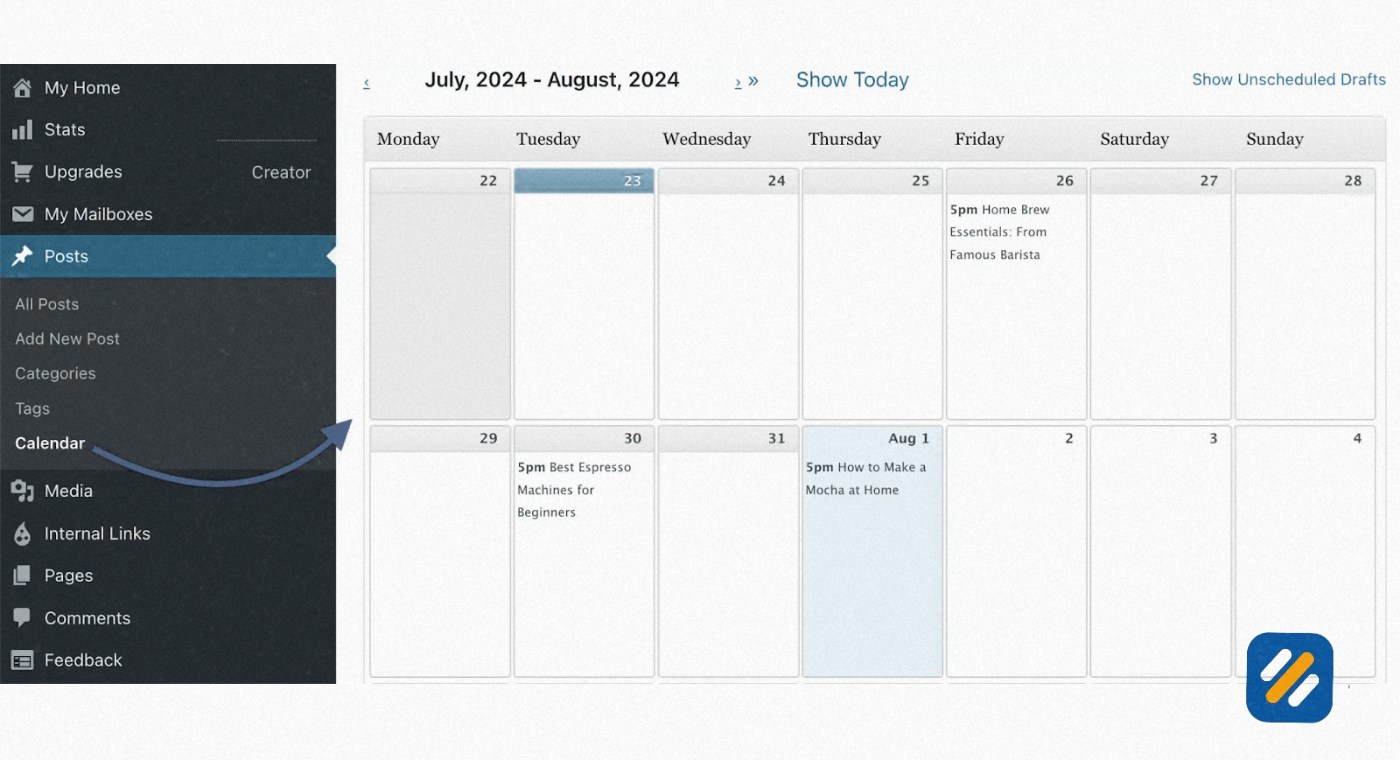
| WordPress Editorial Calendar Plugin | Free | WordPress bloggers only | Manage posts directly in WordPress dashboard | Blog content only, no social or email |
| Airtable | Free and paid plans | Data-driven content teams | Database-style organisation with views | Steeper learning curve than Sheets |
| CoSchedule | Paid | Content marketing teams | Social scheduling plus blog calendar in one | Expensive for small operations |
My recommendation for SEOWithRoman.com at its current stage is Google Sheets for the blog content calendar and a separate simple Notion page for tracking LinkedIn post ideas. Both are free. Both are sufficient. Complexity in tools does not produce better content. Consistency does.
8 Content Calendar Template | What Every Row Should Look Like
Rather than just describing what a template looks like, here is an example of exactly how a completed content calendar row should appear for a blog article:
Example Row for SEOWithRoman.com
Publication Date: Monday 14 October 2026
Title: How to Do Keyword Research for Free Step by Step
Primary Keyword: keyword research for free (880 monthly searches, KD 18)
Secondary Keywords: free keyword tools, Google Keyword Planner, keyword difficulty
Content Type: Blog post, how-to guide
Target Audience: US and UK small business owners, beginner bloggers
Status: Writing
Assigned To: Muhammad Roman
Due Date: Friday 11 October 2026
Content Goal: Organic traffic, internal link to related SEO tools articles
Distribution: LinkedIn post Wednesday 16 October, email newsletter Friday 18 October
Internal Links: Link to "what is SEO" article, link to "Google Search Console setup" article
Notes: Include step by step process, mention free tools only, add comparison table
Every row in your content calendar should be this specific. Vague entries like "SEO article" tell you almost nothing when you sit down to write three weeks later. Specific entries tell you exactly what to write, who it is for, and how it connects to the rest of your content strategy.
9 How to Connect Your Content Calendar to Your Content Strategy
A content calendar without a content strategy behind it is just a schedule. A schedule tells you when to publish. A strategy tells you what to publish and why. Together they become a system that grows your traffic deliberately rather than accidentally.
Here is how to align your content calendar with a real content marketing strategy
Define your content pillars first: Content pillars are the main topic categories your website covers. For SEOWithRoman.com these are the six categories we defined: SEO Basics, Keyword Research, On-Page SEO, Technical SEO, WordPress SEO, and Free SEO Tools. Every article in your content calendar should fall into one of these pillars. If a topic does not fit any pillar, it does not belong on the site.
Balance your calendar across pillars: In any given month, aim to publish at least one or two articles per pillar rather than publishing twelve articles in one category and nothing in others. Balanced topical coverage builds authority faster because Google sees comprehensive expertise across the full subject area.
Map content to the buyer journey: Not all content serves the same purpose. Awareness content educates people who are new to the topic. Consideration content helps people evaluate their options. Decision content helps people choose a service or tool. A strategic content calendar includes all three types and the distribution between them should reflect your business goals. If your primary goal is freelance client leads, you need more decision-stage content than most SEO blogs publish.
Plan content clusters intentionally: A content cluster is a group of related articles that all link to each other and to a central pillar page. Planning clusters inside your content calendar, meaning deliberately grouping related articles in the same month, builds internal linking structures that accelerate ranking for the cluster's topic.
10 3 Expert Tips to Make Your Content Calendar Actually Work Long Term
Most content calendars fail not because they were built wrong but because they were abandoned after the first month. Here are three tips from real experience that keep a content calendar alive and useful for the long term:
Tip 1: Plan content in batches, not one article at a time.
Set aside two hours at the start of each month to plan the entire next month's content in one session. Researching keywords, writing titles, and scheduling dates all at once is four times faster than doing each article individually as the publishing date approaches. Batch planning also gives you a complete picture of the month so you can spot gaps and imbalances before they cause problems.
Tip 2: Treat your content calendar as a living document, not a locked plan.
The best content calendars are updated regularly based on what is actually happening. If a trending topic appears in your niche that needs immediate coverage, add it to the calendar and push something else back a week. If an article took longer than expected and missed its publish date, reschedule it without guilt and move on. Rigidity kills content calendars. Flexibility keeps them useful.
Tip 3: Review performance data before planning the next month.
Before you plan next month's content, spend thirty minutes in Google Search Console reviewing which articles from the past month are getting impressions but not clicks. These articles have keywords ranking between positions 5 and 20 and they represent your highest priority update opportunities. Adding an "update" task to your content calendar for these articles alongside your new content production is one of the fastest ways to grow organic traffic from your existing work.
11 Conclusion
A content calendar is not a sophisticated marketing tool reserved for large teams with big budgets. It is a simple planning document that any blogger, small business owner, or freelance marketer can build in an afternoon using a free Google Sheet.
What it gives you in return is consistency, strategic clarity, faster topical authority growth, and the ability to approach every writing session knowing exactly what you are creating and why it matters.
Start with the basics. Publication date, title, primary keyword, and status. Publish consistently for ninety days. Review what worked. Then build your calendar out into the full system outlined in this guide.
The bloggers and businesses that grow their organic traffic year after year are not the ones with the cleverest content ideas. They are the ones with the most disciplined content planning systems. A content calendar is where that discipline starts.
Have you built a content calendar before or are you starting from scratch? Drop a comment below and tell me which tool you are planning to use. I read every reply.
Join 1,000+ business owners and bloggers who get one actionable SEO tip every week — straight to their inbox. Free forever.
Get Free Weekly Tips →