- What crawlability and indexability actually mean, and why they are not the same thing
- How Googlebot discovers, crawls, renders, and indexes a page, step by step
- What crawl budget is and when it genuinely matters for your site
- How robots.txt, XML sitemaps, canonical tags, and the noindex tag control what Google sees
- The most common crawlability and indexability issues and how to find them in Google Search Console
- A complete technical SEO audit checklist you can run this week
1 What Are Crawlability and Indexability
Before a page can rank for a single keyword, it has to clear two separate gates. Most site owners only find out these gates exist after their traffic quietly disappears and Google Search Console shows a pile of pages sitting outside the index for no obvious reason.
Crawlability is whether search engine crawlers, like Googlebot, can actually reach and read a page on your website. Indexability is a different, later question: once Googlebot has read that page, is it allowed and considered good enough to be stored in Google's index and shown in search results.
These two words get used interchangeably all the time, and that mix up is exactly why so many crawlability and indexability issues go unfixed for months. A page can be perfectly crawlable and still never get indexed. A page can even get indexed, in rare cases, without ever being fully crawled. They are related, but they are not the same failure, and they are not fixed the same way.
I have audited sites where the homepage ranked fine but an entire product category, hundreds of pages, sat invisible in Google for over a year. The cause was not bad content. It was a single crawlability mistake in the site's internal linking that meant Googlebot never even found those pages to begin with. That is the kind of problem this guide is built to help you catch.
2 Crawlability vs Indexability: The Key Differences
Website crawlability and website indexability are sequential, not parallel. A page has to survive step one before it is even eligible for step two. Here is the difference laid out directly.
| Factor | Crawlability | Indexability |
|---|---|---|
| Core question | Can search engine crawlers reach and read this page | Can this page be stored in the index and shown in results |
| Comes first | Yes, always | No, only evaluated after a successful crawl |
| Common blockers | robots.txt disallow rules, broken internal links, server errors, poor site structure | noindex tag, canonical pointing elsewhere, thin or duplicate content, low quality signals |
| How it usually breaks | Bots simply cannot find or access the URL | Bots find and read the page, then decide it is not worth keeping |
| How obvious the problem is | Fairly easy to spot, since the page is blocked outright | Sneaky, the page loads fine for visitors and only fails inside Google's systems |
| Where to check it | Crawl stats and coverage reports in Google Search Console | URL Inspection tool and the Page Indexing report |
The practical takeaway is this. If a page is not crawlable, fixing indexability settings on it does nothing, because Google never gets far enough to read those settings in the first place. Always diagnose crawlability first.
3 How Googlebot Actually Crawls and Indexes a Page
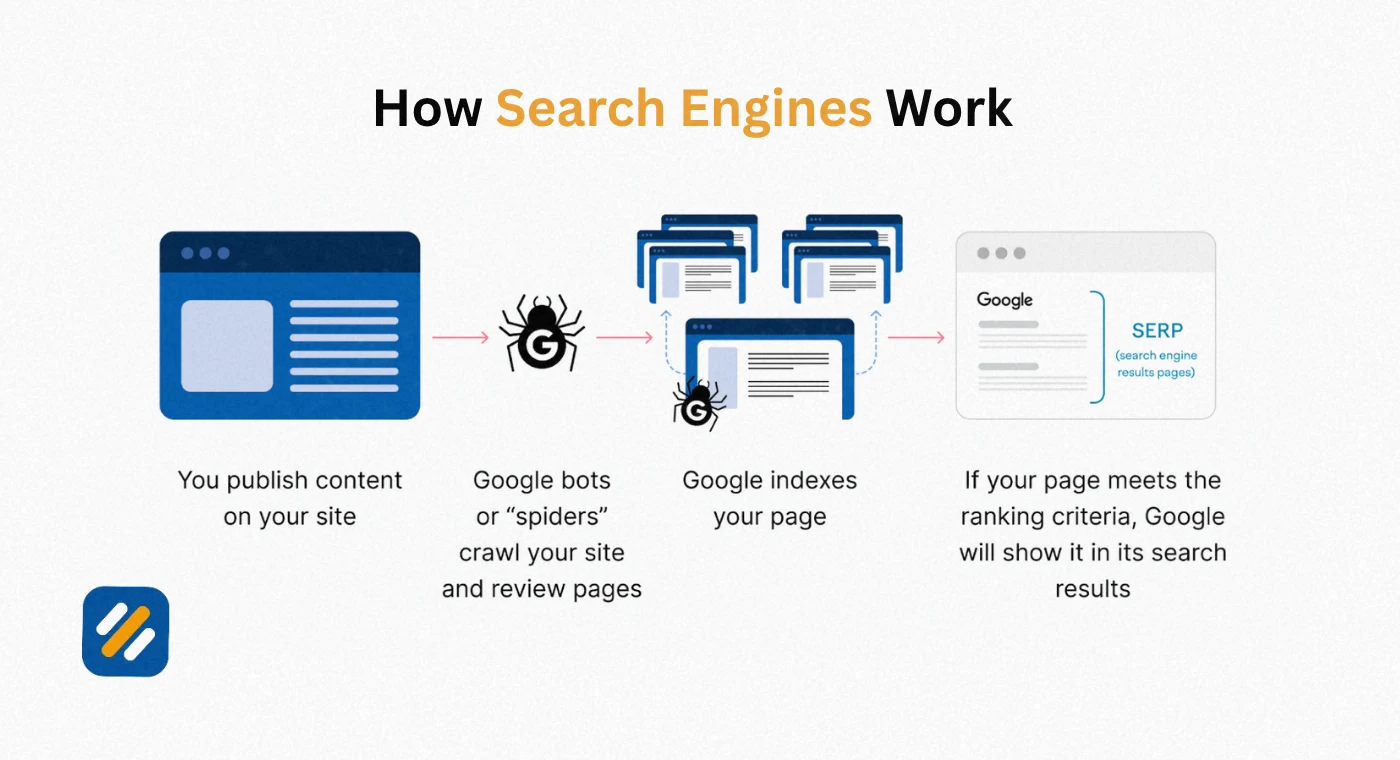
Googlebot is Google's automated crawler, the program responsible for finding, fetching, and passing along the pages that eventually populate Google's search index. Understanding its actual workflow makes almost every fix in this guide make sense instantly, instead of feeling like a checklist you follow blindly.
The process runs in four connected stages
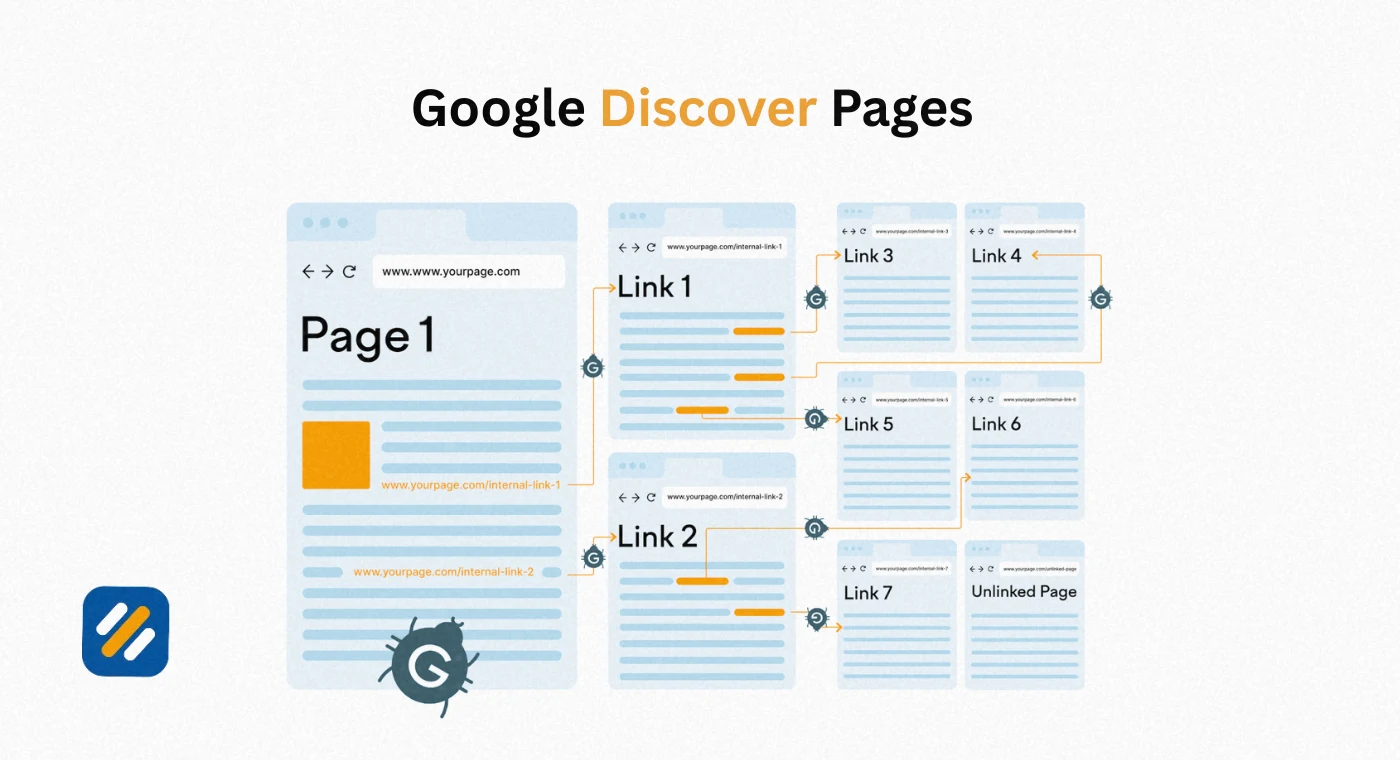
Discovery. Googlebot finds a URL exists, usually through an internal link, an external backlink, or an XML sitemap entry. A page nobody links to and that appears in no sitemap is often never discovered at all.
Crawling. The crawler sends a request to your server, downloads the HTML, and where needed fetches additional resources like CSS, JavaScript, and images separately to understand the full page.
Rendering. Google builds a rendered version of the page much like a browser would, which matters enormously for JavaScript heavy sites where content only appears after scripts run.
Indexing. Google's systems evaluate the rendered content and decide whether to add the page to the index, and if so, which version of the URL to treat as canonical.
A detail most guides skip: most crawl requests today come from the mobile version of Googlebot, since Google runs on a mobile first basis for the overwhelming majority of sites. If your mobile page hides content that your desktop page shows, Google is largely judging you on the version your phone visitors see, not the one you tested on your desktop monitor.
Being crawled does not guarantee being indexed. Google's own documentation is explicit that indexing is not a guarantee, and a page can sit in a crawled but not indexed state indefinitely if it does not clear the quality bar.
4 What Is Crawl Budget and Why It Matters
Crawl budget is the number of pages a search engine is willing and able to crawl on your site within a given period of time. For a small business site with two hundred pages, crawl budget is rarely a real constraint, Google will get to everything without a fight. For a large ecommerce catalog or a publisher with hundreds of thousands of URLs, crawl budget becomes a genuine limiting factor.
Crawl budget is shaped by two things working together: how much your server can handle without slowing down, and how much Google actually wants to crawl based on the site's perceived value and freshness.
- Faceted navigation and filter URLs that generate thousands of near duplicate pages quietly drain crawl budget away from pages that matter
- Slow server response times cause Google to pull back and crawl less aggressively to avoid overloading your site
- Frequent, meaningful content updates on your most important pages signal that revisiting your site is worth the effort
- Orphaned sections with no clear internal path in tend to get crawled rarely, if at all
If your site is under roughly ten thousand pages, spend your time on the other sections of this guide first. Crawl budget only becomes the priority once scale is genuinely working against you.
5 Robots.txt: What It Does and How It Blocks or Allows Crawling
Robots.txt is a plain text file sitting at the root of your domain that gives search engine crawlers instructions about which parts of your site they are and are not allowed to request. It is the very first thing a well behaved crawler checks before requesting anything else.
A critical nuance most beginners miss: robots.txt controls crawling, not indexing. Blocking a URL in robots.txt stops Google from reading its content, but if other sites link to that URL, Google can still index the bare URL using the link's anchor text, just without a title or description. This is exactly why using robots.txt as your only tool to keep a page out of Google is a common and costly mistake.
User-agent: *
Disallow: /admin/
Disallow: /cart/
Allow: /blog/
Sitemap: https://example.com/sitemap.xml
Common robots.txt mistakes worth checking today:
- Accidentally disallowing the entire site with a stray Disallow: / left over from staging
- Blocking CSS or JavaScript folders, which prevents Google from rendering the page correctly
- Forgetting to update the file after a site migration, leaving old rules pointed at URLs that no longer exist.
6 XML Sitemap: How It Helps Search Engine Crawlers Find Your Pages
An XML sitemap is a structured file listing the URLs on your site that you want search engines to know about, along with metadata like when each page was last updated. It does not force Google to crawl or index anything, but it dramatically speeds up discovery, especially for new pages, large sites, and pages that are not well linked internally.
- Include only canonical, indexable URLs, never pages that are noindexed, blocked, or redirected
- Keep individual sitemap files under fifty thousand URLs, splitting larger sites into multiple sitemap files referenced by a sitemap index
- Submit the sitemap directly inside Google Search Console and reference its location inside robots.txt
- Update it automatically whenever content is published, rather than relying on a manual, forgotten process
- A sitemap is a map, not a magic key. It tells Googlebot where the doors are, it does not open any of them for you.
7 Canonical Tags and Duplicate Content
A canonical tag is an HTML element that tells search engines which version of a page is the master copy when multiple URLs show the same or very similar content. This happens more often than most site owners realize, through tracking parameters, printer friendly versions, filtered category pages, and www versus non www duplicates.
<link rel="canonical" href="https://example.com/best-running-shoes/" />
Canonical tags directly affect indexability. When Google sees a canonical tag pointing elsewhere, it typically consolidates ranking signals onto the canonical target and treats the current URL as a duplicate rather than indexing it separately. This is a normal, healthy outcome when set up correctly, and a serious problem when set up by accident, such as a template bug that canonicalizes every product page to the homepage.
8 The Noindex Tag: When and How to Use It
The noindex tag is a direct instruction telling search engines not to include a specific page in their index, even if that page is fully crawlable. It is the correct tool for pages you want visitors and internal navigation to reach, but that add no value in search results, such as internal search results pages, thank you pages, or thin tag archives.
<meta name="robots" content="noindex, follow">
Two mistakes show up constantly during audits. The first is combining noindex with a robots.txt disallow on the same page, which is contradictory, since Google needs to crawl a page to see the noindex tag, and a robots.txt block prevents exactly that crawl. The second is leaving a noindex tag active on a page after a staging site goes live, quietly keeping real, valuable pages out of the index for months without anyone noticing.
A quick way to remember the difference: Robots.txt says do not visit. Noindex says you may visit, but do not keep a copy.
9 Internal Linking: The Most Underrated Crawlability Fix
If robots.txt and sitemaps are the formal instructions you give crawlers, internal linking is the everyday path Googlebot actually follows to move around your site. A page with zero internal links pointing to it, often called an orphan page, may never be discovered at all, no matter how good the content is or how many times it appears in your sitemap.
- Link to new and important pages from your homepage or a high traffic hub page within the first few weeks of publishing
- Avoid burying key pages more than three or four clicks deep from the homepage
- Use descriptive anchor text instead of generic phrases like "click here," since anchor text gives crawlers context about the linked page's topic
- Regularly audit for orphan pages using a crawler tool, since they are invisible in normal browsing and easy to miss
This is also the single fastest fix available to most sites. Improving internal linking usually costs nothing beyond a few hours of editing and can resolve crawlability and indexability issues that would otherwise take months to surface naturally.
10 Common Crawlability and Indexability Issues Checklist
Use this table as a working checklist during your next technical SEO audit. Each row includes the underlying cause so you fix the actual problem instead of just the symptom.
| Issue | Category | Typical Cause | Fix |
|---|---|---|---|
| Blocked by robots.txt | Crawlability | Disallow rule left from staging or misconfigured plugin | Remove or correct the disallow rule for live pages |
| Crawled, currently not indexed | Indexability | Thin, duplicate, or low value content | Improve depth and uniqueness, or consolidate similar pages |
| Discovered, not yet indexed | Crawlability | Low crawl priority or crawl budget exhaustion | Strengthen internal links, submit via sitemap |
| Server error (5xx) | Crawlability | Hosting downtime or overload during crawl attempts | Fix server stability and monitor uptime |
| Redirect error | Crawlability | Redirect chains or loops | Simplify to a single direct redirect |
| Duplicate without user selected canonical | Indexability | Missing or inconsistent canonical tags | Add clear, consistent canonical tags |
| Excluded by noindex tag | Indexability | Intentional or accidental noindex left in place | Verify intent, remove if unintentional |
| Orphan page | Crawlability | No internal links pointing to the page | Add internal links from relevant pages |
11 How to Check Crawlability and Indexability Using Google Search Console
Google Search Console is the free, official tool for seeing exactly how Google is crawling and indexing your site, and it should be the first place you look before assuming anything about a page's status.
- Open the Page Indexing report. Under the Indexing section, this shows how many pages are indexed versus excluded, with a clear reason listed for every excluded group.
- Use the URL Inspection tool on specific pages. Paste in any URL to see its last crawl date, whether it is indexed, and any issues Google detected on that exact page.
- Check the Crawl Stats report. Found under Settings, this shows crawl requests over time, response times, and whether Googlebot is hitting errors on your server.
- Review the sitemaps report. Confirms whether your submitted XML sitemap was processed successfully and how many URLs from it are indexed.
- Request indexing for fixed pages. Once you have corrected an issue, use the Request Indexing option inside URL Inspection to prompt a faster recrawl rather than waiting for Google to return naturally.
12 Step by Step Technical SEO Audit for Crawlability and Indexability
Here is the exact sequence I run through on every new client site before touching content or backlinks, because none of that work matters if the pages are not reaching the index in the first place.
- Check robots.txt for accidental blocks. Open yourdomain.com/robots.txt directly and read every line, confirming nothing important is disallowed.
- Confirm your XML sitemap is accurate and submitted. Verify it only lists live, canonical, indexable URLs and is correctly submitted inside Google Search Console.
- Run a full site crawl with a crawler tool. Look specifically for 4xx errors, 5xx errors, redirect chains, and orphan pages with no internal links.
- Audit canonical tags across templates. Spot check category pages, filtered pages, and paginated pages for canonical tags pointing somewhere unexpected.
- Search for stray noindex tags. Check high value pages specifically, since a single noindex tag left behind after a redesign can quietly remove your best content from search.
- Review the Page Indexing report weekly. Set a recurring reminder, since new indexing issues can appear after any site update, plugin change, or migration.
13 Tools and Trusted Sources for Crawlability and Indexability
| Resource | What It Helps With | Link |
|---|---|---|
| Google Search Console | Official crawl stats, page indexing reports, and URL inspection | search.google.com/search-console |
| Google Search Central | Official documentation on crawling, indexing, and robots.txt rules | developers.google.com/search |
| Google Rich Results Test | Checks how Googlebot renders a page's structured content | search.google.com/test/rich-results |
| Screaming Frog SEO Spider | Crawls your full site to surface broken links, redirects, and orphan pages | screamingfrog.co.uk |
| robots.txt Tester | Validates robots.txt rules before you push them live | Available inside Google Search Console |
14 3 Expert Tips for Fixing Crawlability and Indexability Issues Fast
Tip 1: Fix crawlability before you touch anything else. If a page is blocked from crawling, spending time improving its content, adding schema, or building links to it is wasted effort until the block is removed. Always confirm a page is crawlable first, then move on to indexability, then move on to everything else.
Tip 2: Set a monthly Search Console review, not just a one time audit. Indexing issues are not a problem you solve once. A single template change, plugin update, or migration can quietly introduce new noindex tags or canonical errors across hundreds of pages overnight. I check the Page Indexing report on every client account on the first of every month without exception.
Tip 3: Treat "Crawled, currently not indexed" as a content signal, not a technical bug. When pages show this status with no obvious technical block, it usually means Google crawled the page and judged the content too thin or too similar to something else already indexed. The fix is almost always to genuinely improve or consolidate the content, not to keep resubmitting the same page and hoping for a different result.
15 Conclusion
Crawlability and indexability rarely get the attention they deserve because neither one is visible in the way a keyword ranking or a traffic graph is. They sit underneath everything else, quietly deciding whether your content ever gets the chance to compete at all.
The fix is not complicated, but it does require checking the right things in the right order. Confirm search engine crawlers can actually reach your pages through clean robots.txt rules, a working XML sitemap, and solid internal linking. Then confirm the pages they reach are actually worth keeping, through correct canonical tags, intentional use of the noindex tag, and content that clears the quality bar Google is now applying more strictly than ever.
Open Google Search Console this week, run through the Page Indexing report, and fix whatever it flags first before writing another word of new content. A perfectly crawlable and indexable site with average content will consistently outperform a brilliant article that Google never gets the chance to see.
Have a question about a specific crawl error or indexing issue on your site? Drop a comment below and I will answer it personally.
Join 1,000+ business owners and bloggers who get one actionable SEO tip every week — straight to their inbox. Free forever.
Get Free Weekly Tips →