
- What content pruning SEO actually means and why deleting pages can grow your traffic
- How outdated, thin, and duplicate content quietly drags your whole domain down
- The exact difference between refreshing, consolidating, and removing a page
- A full step by step content audit process you can run this month
- How content pruning protects crawl budget and stops keyword cannibalization
- When to use 301 redirects versus a straight deletion, and how to fix internal linking after a prune
1 What Is Content Pruning SEO
Content pruning SEO is the practice of finding pages on your website that are outdated, underperforming, thin, or duplicate, and then improving, merging, or removing them so the rest of your site ranks better. The name comes from gardening. A gardener does not let every branch grow forever, because the weak ones steal light and water from the healthy ones. A website works the same way.
Most site owners think SEO is only about adding content. Publish more, rank more, that is the assumption almost everyone starts with. Content pruning flips that assumption on its head. Sometimes the fastest way to improve your rankings is to remove or fix the pages that are already dragging you down, not to write something new.
I have run this exact process on client sites where 30 percent of the blog had not received a single visit in over a year. After we pruned that dead weight, properly redirected the pages worth keeping, and merged the overlapping ones, the site's overall organic traffic went up within two months, even though we had technically published fewer live URLs than before. That result surprises people the first time they see it, but it is consistent with how Google actually evaluates a domain.
Simple example: Imagine a site with 500 blog posts. Fifty of them get real traffic and rank well. Two hundred get almost nothing and were written years ago with thin, generic advice. The other 250 are somewhere in between. A content pruning SEO project focuses entirely on that middle and low tier, deciding for each page whether to refresh it, merge it into a stronger page, or remove it, so Google spends its attention on the 50 pages that actually deserve to rank.
2 Why Content Pruning Works: The Real Mechanics Behind It
Content pruning is not a superstition or an SEO myth, it addresses three specific technical and quality problems that build up naturally as a website grows.
Site wide quality signals: Google does not evaluate every page on your site in total isolation. It also forms a general impression of your domain's overall quality. A site where half the pages are thin, outdated, or barely visited sends a weaker overall quality signal than a smaller site made almost entirely of strong pages. This idea is closely related to what many SEOs call the "site quality algorithm," and it is one reason two websites with a similar backlink profile can perform very differently in search.
Crawl budget: Crawl budget is the amount of time and resources Google is willing to spend crawling your website during a given period. On smaller sites this rarely matters, but once a site grows into the thousands of pages, Googlebot can spend a meaningful share of its crawl budget on old, low value URLs instead of your newest or most important content. Removing or consolidating dead pages frees that budget for pages that actually deserve fresh crawling and indexing.
Keyword cannibalization: Keyword cannibalization happens when two or more pages on the same site are trying to rank for the same or very similar keyword. Instead of one strong page winning a solid position, Google gets confused about which page to rank, and both pages often end up weaker than a single, consolidated page would have been. Content pruning is one of the most reliable ways to find and fix cannibalization, because merging competing pages removes the confusion entirely.
3 Content Pruning SEO vs Just Deleting Old Posts
A common mistake is treating content pruning as simply deleting anything old. That is not what a proper content pruning strategy looks like. Age by itself is not a reason to remove a page, plenty of old pages still rank well and bring in steady traffic. The table below shows how a real content pruning strategy differs from a careless "delete anything old" approach.
| Factor | Careless Deleting | Real Content Pruning Strategy |
|---|---|---|
| Decision basis | Publish date alone | Traffic, rankings, backlinks, and business value combined |
| Main action | Delete the page | Refresh, consolidate, or remove, chosen per page |
| Handling old URLs | Leaves a 404 error | Uses 301 redirects to a relevant live page when needed |
| Internal links | Left broken, pointing to dead pages | Cleaned up and repointed during the same project |
| Backlinks | Ignored, equity is lost | Checked first, since a page with strong backlinks is often worth saving |
| Outcome | Lost link equity, broken user paths, no ranking gain | Consolidated authority, cleaner site, measurable ranking improvement |
Deleting a page that still holds valuable backlinks, for instance, throws away link equity that took real effort to earn. That is why a content audit always comes before any pruning decision, never after.
4 The Three Types of Content Pruning: Refresh, Consolidate, Remove
Every page you review during a pruning project will fall into one of three buckets. Understanding the difference is the core skill behind doing this well.
Refresh
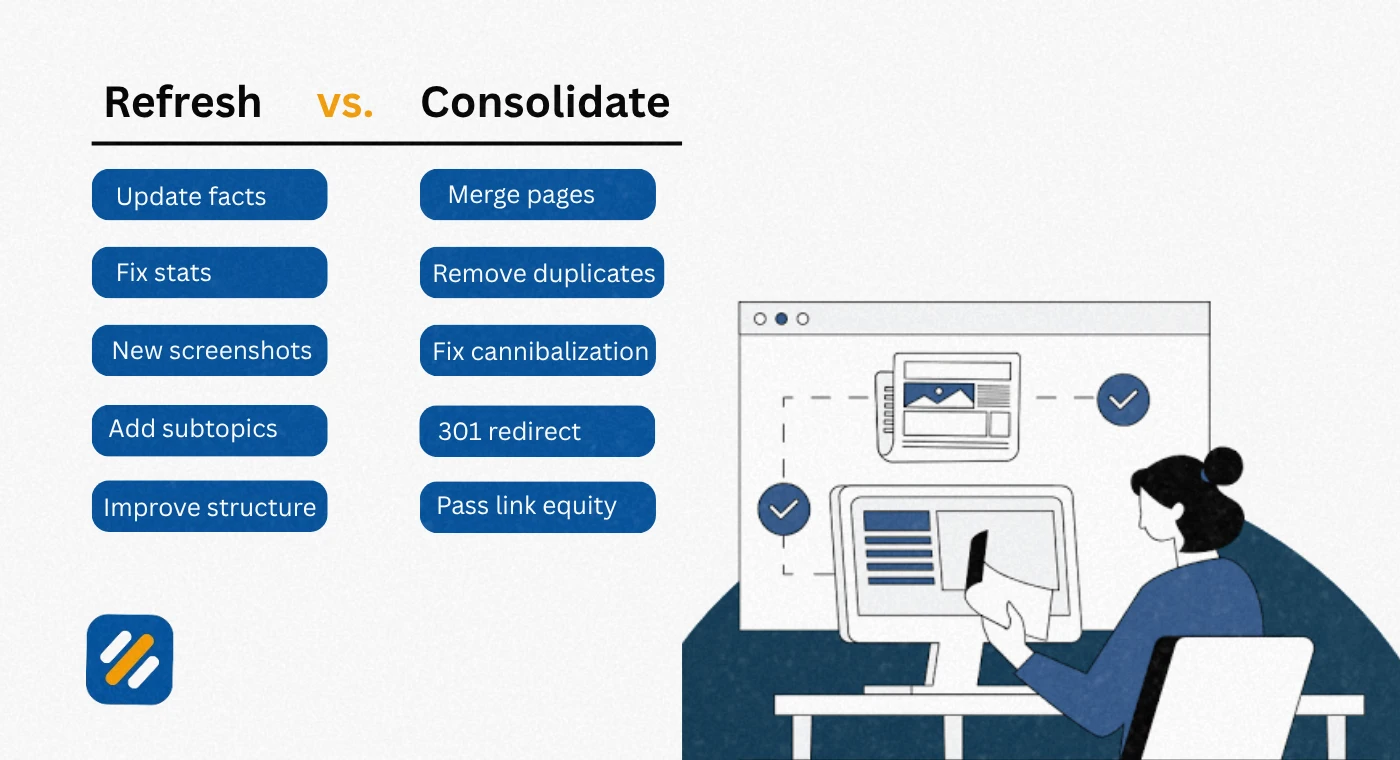
A page gets refreshed when the topic still has real search demand and the page is fundamentally sound, but it has gone stale. This applies to outdated content where statistics, screenshots, prices, or recommendations no longer reflect reality. Refreshing means updating facts, adding missing subtopics, improving the structure, and often expanding thin sections into something genuinely useful.
Consolidate
Consolidation is the fix for duplicate content and keyword cannibalization. When you find two, three, or more pages competing for the same intent, you combine the best material from each into a single, stronger page, then 301 redirect the weaker URLs into the surviving one. This passes along any backlinks and ranking history the old pages had earned, instead of losing that value.
Remove
Removal is for content that has no search demand left, no backlinks worth preserving, and no realistic path to ever ranking or converting. Old announcement posts, expired promotions, and thin content built around a keyword nobody searches for anymore usually belong here. A clean removal, done with the right redirect or a proper 410 status where appropriate, is far better for your site than letting dead weight sit indexed forever.
Pro Tip: Never decide a page's fate from data alone. Before you remove or consolidate anything, actually read the page. Sometimes a page with almost no organic traffic still gets meaningful referral traffic, ranks for a valuable long tail term Search Console is not surfacing clearly, or supports a page that does convert. Data tells you where to look, judgment tells you what to do.
5 How to Do a Content Audit Before You Prune Anything
A content audit is the research phase that comes before any pruning decision, and it is the part most people rush through or skip entirely. Here is the process I use on every project.
Export a full list of indexed URLs. Pull every page from your CMS and cross check it against Google Search Console's index coverage report, so you know exactly what Google currently has indexed.
Pull performance data for every URL. Gather organic clicks, impressions, average position, and click through rate from Search Console, plus sessions, engagement rate, and conversions from your analytics platform.
Check backlinks per page. Use a backlink tool to see which pages hold referring domains worth protecting. A page with almost no traffic but strong backlinks is often a candidate for consolidation, not deletion.
Group pages by topic and intent. Sort your list by subject so you can immediately spot duplicate content and keyword cannibalization, where several URLs are clearly fighting for the same search intent.
Score each page against clear thresholds. Set simple rules in advance, such as flagging any page with fewer than ten organic clicks in the last twelve months, or any page ranking beyond position 30 for its main target keyword.
Assign a decision to every flagged page. Mark each one as keep, refresh, consolidate, or remove, and note which surviving URL a consolidated or removed page should redirect to.
Execute in batches, then monitor. Make the changes in manageable batches rather than all at once, and track rankings and traffic for four to six weeks after each batch before drawing conclusions.
| Metric to Pull | Where to Get It | What It Tells You |
|---|---|---|
| Organic clicks and impressions | Google Search Console | Whether the page has any real search demand left |
| Average position | Google Search Console | Whether poor rankings, not lack of demand, explain low traffic |
| Sessions and engagement rate | Google Analytics (GA4) | Whether visitors who arrive actually find the page useful |
| Referring domains | Ahrefs, Semrush, or similar | Whether the page carries link equity worth protecting |
| Ranking keywords | Ahrefs, Semrush, or similar | Whether the page overlaps with another page on your own site |
| Conversions or goal completions | Google Analytics (GA4) | Whether the page drives real business value beyond traffic |
6 Spotting the Content Worth Pruning: Outdated, Thin, and Duplicate Content
Three categories of underperforming content show up on almost every website, and each one needs a slightly different fix.
Outdated content is accurate for its time but no longer reflects current facts, prices, tools, or best practices. It usually just needs a refresh rather than removal, since the underlying topic often still has search demand.
Thin content is a page that never had enough substance to satisfy the search intent behind its target keyword. Short, generic posts written purely to hit a word count target are the classic example. Thin content is usually a candidate for a full rewrite or consolidation into a more complete resource, rarely a simple refresh.
Duplicate content happens when two or more URLs on your own site cover essentially the same topic, sometimes because of old category or tag pages, sometimes because different writers unknowingly covered the same subject months apart. Duplicate content is almost always a consolidation case, since splitting authority across near identical pages helps nobody.
Pro Tip: Run a simple site search using site:yourdomain.com "your topic phrase" in Google before you write anything new. If you already have three pages loosely covering the same idea, that is a pruning opportunity sitting in plain sight, not a reason to write a fourth.
7 301 Redirects: Doing Them Correctly During a Prune
A 301 redirect tells search engines and browsers that a page has permanently moved to a new address, and it passes along the large majority of the original page's ranking signals to the new destination. Getting redirects right is what separates a content pruning project that grows traffic from one that quietly loses it.
- Always redirect a removed or consolidated page to the single most relevant live page, never to your homepage as a default fallback
- Avoid redirect chains, where one redirect points to another redirect, since each hop can weaken the signal being passed
- Update your XML sitemap so it never includes a URL you have just redirected away from
- Give Google Search Console a few weeks to process the change before judging the results, since re-crawling and re-indexing is not instant
- Keep a spreadsheet log of every redirect you create during the project, including the reason, so future audits do not have to guess why a decision was made
8 Internal Linking Cleanup: The Step Most People Forget
Internal linking is the connective tissue of your website, and it breaks quietly every time you remove or merge a page without checking what pointed to it. If you delete a page without fixing the links pointing to it, visitors and Googlebot alike hit dead ends, and the equity those internal links were passing simply evaporates.
- Before removing or consolidating any page, search your CMS or use a crawler to find every internal link pointing to it
- Update each of those links to point directly to the surviving page, rather than relying on the redirect to do that work silently
- Check your navigation menus, footer, and any "related posts" widgets, since these are commonly missed during manual cleanups
- Re-crawl your site after the project with a tool like Screaming Frog to confirm no new broken internal links were introduced
9 How Often Should You Prune Content
There is no single universal schedule, because the right cadence depends heavily on how much content your site publishes and how large it already is.
| Site Size or Publishing Pace | Recommended Pruning Cadence |
|---|---|
| Small site, under 100 pages | Once or twice a year |
| Mid size site, publishing weekly | Every one to three months, in small batches |
| Large site, publishing daily, or 10,000-plus pages | Continuous, treated as an ongoing part of the content workflow |
| Site recovering from a traffic drop | Immediately, as a diagnostic step, before publishing anything new |
If you have never run a large scale content pruning project before, start with one comprehensive audit covering the entire site, then move to smaller, regular passes afterward rather than repeating a massive audit from scratch every time.

10 Common Content Pruning Mistakes to Avoid
Pruning by date alone. Age is a clue, not a verdict. Plenty of pages published years ago still earn solid, steady traffic today.
Deleting pages with strong backlinks. Always check backlinks before removal. A 301 redirect into a relevant live page preserves that equity instead of throwing it away.
Making changes all at once on a large site. Rolling out hundreds of redirects and removals in a single day makes it far harder to tell which specific change caused which result.
Skipping the internal link cleanup. A redirect fixes where a link ultimately lands, but it does not fix the confusing experience of a link that looked broken in the meantime.
Treating pruning as a one time project. Content decays continuously. Without a recurring review cadence, the same problems simply rebuild themselves within a year or two.
11 Tools for Content Pruning: A Comparison
| Tool | Best For | Free Option Available |
|---|---|---|
| Google Search Console | Clicks, impressions, average position, and indexing status per URL | Yes, fully free |
| Google Analytics (GA4) | Sessions, engagement rate, and conversions per page | Yes, fully free |
| Ahrefs | Backlink data and ranking keyword overlap between pages | Limited, through Ahrefs Webmaster Tools |
| Semrush | Content audit workflows and keyword cannibalization reports | Limited free trial features only |
| Screaming Frog | Crawling your site to map internal links before and after pruning | Yes, free up to 500 URLs |
12 3 Expert Tips for a Content Pruning Project That Actually Works
Tip 1: Run a click gap analysis before you touch anything. Compare your last six months of Search Console data against the six months before that. Pages with a steadily declining average position, not just low absolute traffic, are often your best refresh candidates, since they show Google losing confidence in a page that was previously trusted.
Tip 2: Prune in small batches and log every change. Keep a simple spreadsheet with the URL, the decision, the destination redirect if any, and the date. When rankings move a few weeks later, you will know exactly which batch to credit or investigate, instead of guessing across dozens of simultaneous changes.
Tip 3: Treat consolidation as a rewrite, not a copy paste job. When you merge three thin pages into one strong page, do not simply stack their old paragraphs together. Rewrite the combined page as if you were creating it fresh, keeping only the genuinely useful pieces from each source, so the final result reads as one coherent resource rather than three old posts glued together.
14. Conclusion
Content pruning SEO is not about punishing old content or chasing an arbitrary page count. It is about being honest with yourself about which pages on your site are actually serving your readers and earning their place in Google's index, and which ones are quietly holding the rest of your site back.
Start with a real content audit, not a guess. Pull your Search Console and analytics data, check backlinks before you remove anything, and sort every underperforming page into refresh, consolidate, or remove. Handle 301 redirects and internal linking carefully, since sloppy execution is what turns a good pruning strategy into a traffic loss instead of a traffic gain.
Do this once properly, then build it into a recurring habit every few months, and you will find that a smaller, sharper site consistently outperforms a large one padded with dead weight.
Have a question about content pruning or how to start your own audit? Drop a comment below and I will answer it personally.
Join 1,000+ business owners and bloggers who get one actionable SEO tip every week — straight to their inbox. Free forever.
Get Free Weekly Tips →