- Wix SEO has improved dramatically since 2016 and now supports almost every essential on-page SEO task
- Google's own John Mueller confirmed that Wix is a fine platform for SEO and businesses do not need to switch
- Wix SEO settings including title tags, meta descriptions, alt text, canonical tags, and sitemaps are all fully accessible
- The biggest Wix SEO limitation is not the platform itself but how most Wix users never configure the available SEO settings
- A properly optimised Wix website can rank on page one for competitive local and niche keywords in 2026
1 What Is Wix SEO and Is Wix Actually Good for SEO in 2026
If you have ever searched "is Wix good for SEO" you have probably found conflicting answers. Some articles written in 2018 tell you Wix is terrible for SEO and you should switch to WordPress immediately. Others tell you Wix is perfectly fine. The truth, as someone who has audited and optimised websites across multiple platforms for six years, is more nuanced than either extreme.
Wix SEO refers to the process of optimising a website built on the Wix platform to rank higher in Google search results. This includes configuring Wix SEO settings, writing optimised content, building internal links, improving page speed, and connecting tools like Google Search Console and Google Analytics.
The reputation that Wix is bad for SEO comes from its early years between 2006 and 2016 when the platform genuinely lacked basic SEO functionality. You could not easily add alt text to images, URL structures were rigid and messy, and page speed was noticeably poor.
That is no longer the case. Wix has invested heavily in its SEO infrastructure over the past several years. Google's own Search Advocate John Mueller stated publicly that Wix is a fine platform for SEO and that businesses do not need to switch platforms based on the old reputation.
The real question is not whether Wix can rank. It absolutely can. The question is whether you are using its SEO features correctly.
2 Wix SEO Settings | Where to Find Everything and What Each Setting Does
One of the most common mistakes Wix website owners make is never exploring the SEO settings available to them. Wix has built a surprisingly comprehensive set of SEO controls. Here is where to find them and what each one does.
Wix SEO Dashboard
Navigate to Marketing and SEO in your Wix dashboard, then click Get Found on Google. This opens the Wix SEO Setup Checklist, which walks you through the most important configuration steps for your entire website. Complete every item on this checklist before publishing any content.
Page-Level SEO Settings
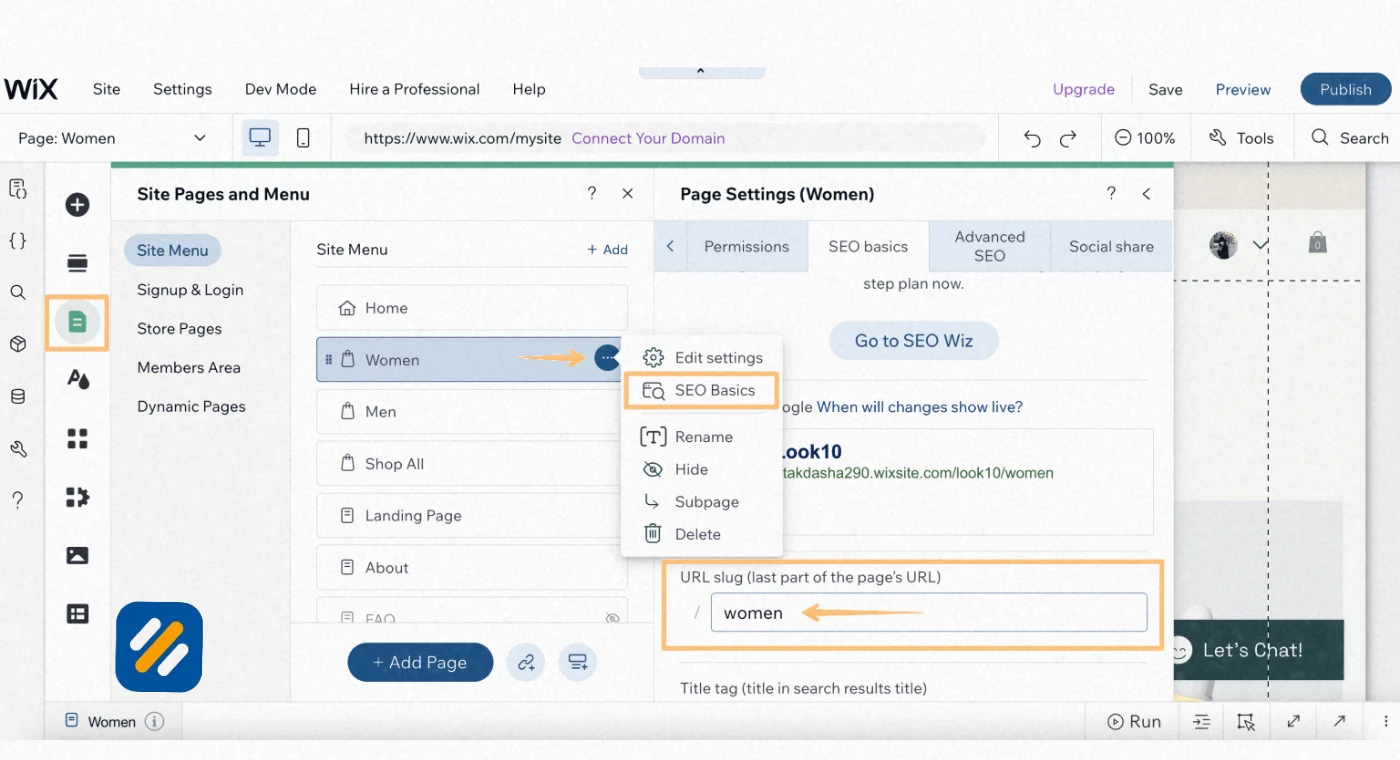
For each individual page on your Wix website, click the three-dot menu next to any page in your Pages and Menu section, then select SEO Basics. Here you can configure:
- Page title tag up to 60 characters
- Meta description up to 160 characters
- Social share image for when the page is shared on social media
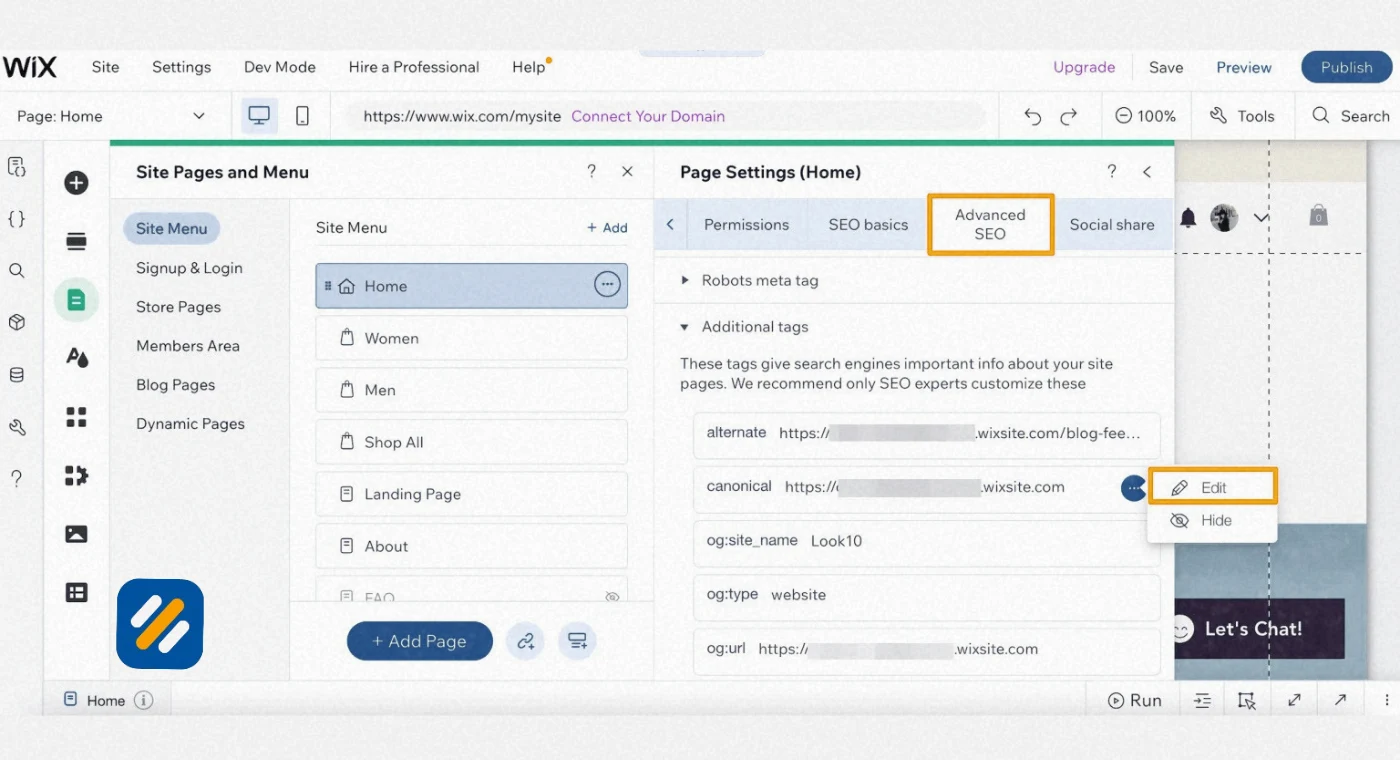
- Canonical URL to prevent duplicate content issues
- Whether the page should be indexed or noindexed
Advanced SEO Settings
Under the Advanced SEO tab for each page you can add custom meta tags, set robots directives, and add structured data markup manually if needed. Most beginners will not need this section immediately but it is valuable as your SEO strategy matures.
Wix SEO Patterns
For dynamic pages like blog posts, product pages, or portfolio items, Wix lets you set SEO patterns that automatically apply structured title tag and meta description formulas across all pages of that type. This is one of the most time-saving features Wix offers and one that most users never discover.
3 How to Build a Wix SEO Strategy That Actually Works
Having access to Wix SEO settings is only the starting point. Without a clear strategy, even a perfectly configured website will fail to rank. Here is the exact strategy framework I use when optimising a Wix website from scratch.
Phase 1: Technical Foundation
Before creating any content, your Wix website needs a clean technical foundation. This means:
Connecting your site to Google Search Console through Wix's built-in integration under Marketing and SEO. This gives Google official permission to crawl your site and gives you access to indexing data, search performance reports, and crawl error alerts.
Setting your preferred domain version. Decide whether your site will use www or non-www and make sure all URLs redirect to your chosen version consistently. Mixed versions create duplicate content issues that confuse Google about which version to index.
Verifying your sitemap is live and submitted. Wix automatically generates a sitemap at yourdomain.com/sitemap.xml. Submit this URL in Google Search Console under the Sitemaps section so Google can efficiently discover all your pages.
Phase 2: Keyword Research and Content Planning
Every page on your Wix website needs a target keyword before any content is written. Use Google Keyword Planner, Ahrefs free keyword generator, or Semrush to identify keywords with at least 100 monthly searches and a difficulty score your domain can realistically compete for.
For a new Wix website, target keywords with a difficulty score under 20 for your first 20 pages. These low competition keywords allow you to build your first rankings and establish domain authority before tackling harder terms.
Phase 3: On-Page Optimisation
Every page you publish needs these on-page elements configured before it goes live:
A title tag that contains the primary keyword within the first four words, stays under 60 characters, and includes a value proposition that makes someone want to click.
A meta description under 160 characters that restates the keyword naturally, promises a specific outcome, and ends with an implicit or explicit call to action.
A clear H1 heading that matches or closely mirrors the title tag. On Wix, your main page heading automatically becomes the H1. Make sure it contains your primary keyword.
At least two to three internal links connecting the page to other relevant pages on your Wix website.
4 Wix Keywords | How to Find, Place, and Optimise Them Correctly
Wix keywords are simply the search terms you want each page to rank for. The platform itself does not have a built-in keyword research tool, which means you need to use external tools to find the right keywords and then implement them through Wix's SEO settings.
Here is the complete keyword optimisation process for a Wix website page:
Finding the right keyword: Use Ahrefs free keyword generator, Google Keyword Planner, or the free version of Semrush to find a primary keyword with confirmed search volume. For service pages target keywords with local modifiers like "plumber in Manchester" or "SEO consultant London." For blog content target informational keywords like "how to" and "what is" queries.
Placing the keyword correctly: Once you have your keyword, place it in these locations on your Wix page:
| Placement Location | How to Access in Wix | Importance Level |
|---|---|---|
| Title tag | Page SEO Settings then SEO Basics | Critical |
| Meta description | Page SEO Settings then SEO Basics | High |
| H1 heading | Click the main heading widget and edit text | Critical |
| First paragraph of page content | Click the text widget and edit directly | High |
| At least one H2 subheading | Click the subheading widget and edit | Medium |
| Image alt text | Click the image then Settings then Alt Text | Medium |
| URL slug | Page SEO Settings then URL Slug | High |
| Page content body at 1% density | Distributed naturally throughout text | High |
The URL slug mistake most Wix users make: By default, Wix creates URLs based on your page title. A page titled "About Our Amazing Cleaning Services in London" becomes a long messy URL. Always manually edit the URL slug to something clean and keyword-focused like /cleaning-services-london before publishing.
5 Wix SEO vs WordPress SEO | An Honest Comparison for 2026
This is the comparison every Wix user eventually wants to see. After working with both platforms across dozens of client websites, here is an honest side-by-side breakdown:
| Feature | Wix SEO | WordPress SEO |
|---|---|---|
| Title tag control | Full control via SEO settings | Full control via Rank Math or Yoast |
| Meta description | Full control | Full control |
| URL structure | Customisable but with some limitations | Fully customisable |
| Image alt text | Fully supported | Fully supported |
| Sitemap | Auto-generated, limited manual control | Fully customisable via plugins |
| Schema markup | Basic built-in plus manual option | Full control via Rank Math |
| Page speed | Good out of the box, limited optimisation control | Highly optimisable with WP Rocket and caching |
| Multilingual SEO | Limited URL control for different languages | Full control via WPML or Polylang |
| Ease of use | Beginner friendly, no coding needed | Steeper learning curve |
| Cost | Monthly subscription includes hosting | Lower base cost but requires separate hosting |
| Plugin ecosystem | Limited app market | Thousands of plugins available |
| Best for | Small businesses, local sites, personal brands | Blogs, large sites, advanced SEO needs |
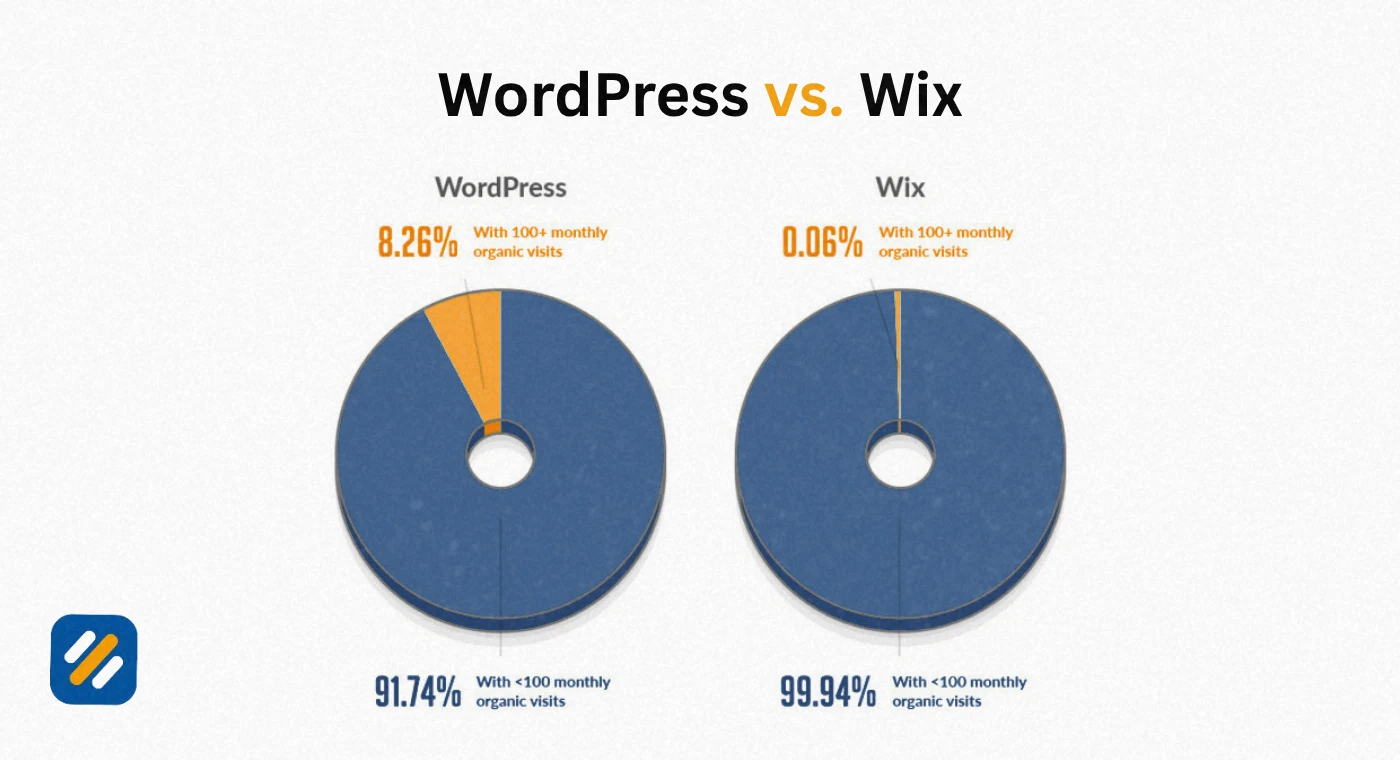
The honest conclusion is that Wix handles 90% of what most small business websites and local businesses need for SEO. The remaining 10%, mostly advanced technical SEO control and multilingual SEO, is where WordPress has a genuine advantage. If you are already on Wix and your business fits within the majority use case, switching to WordPress is not worth the disruption.
6 How to Implement Wix SEO Step by Step | The Complete Setup Guide
Here is the exact step by step process to fully implement Wix SEO on a new or existing website:
Step 1: Complete the Wix SEO Setup Checklist
Go to Marketing and SEO then Get Found on Google. Answer the business name and keyword questions. Work through every item on the checklist including connecting Google Search Console, setting your homepage title tag, and making your site mobile ready.
Step 2: Set your homepage SEO correctly
Your homepage is your most important page. Its title tag should follow this formula: Primary Keyword + Location or Audience + Brand Name. For example: "SEO Services for Small Businesses in London | YourBrand." Keep it under 60 characters.
Step 3: Configure SEO settings for every page
Work through each page systematically. For each one, open SEO Basics and set a unique title tag, meta description, and URL slug. No two pages on your website should share the same title tag or meta description.
Step 4: Optimise every image
Click each image widget on your Wix site and open Settings. Add descriptive alt text to every image using natural language that describes what the image shows and where relevant includes a keyword. Google cannot see images but it can read alt text, which is an additional relevance signal for your page.
Step 5: Build your internal link structure
Every page on your website should be linked to from at least one other page. Use relevant anchor text that describes the destination page rather than generic phrases like "click here." On Wix, highlight text in any text widget, click the chain icon, and select the destination page from your site pages list.
Step 6: Connect Google Analytics 4
Go to Marketing and SEO then Marketing Integrations and connect your GA4 property. This gives you full traffic data, user behaviour reports, and conversion tracking directly tied to your Wix website.
Step 7: Submit your sitemap
Go to Google Search Console, select your property, click Sitemaps in the left sidebar, and enter yourdomain.com/sitemap.xml. Google will begin crawling and indexing your pages from this submission.
Step 8: Publish and monitor
After publishing, check Google Search Console weekly for the first three months. Monitor the Coverage report for indexing errors and the Performance report for your first keyword impressions and clicks.
7 Wix Page Speed and Core Web Vitals | What You Can and Cannot Control
Page speed is a confirmed Google ranking factor and a significant user experience signal. Here is the honest truth about Wix page speed and what you can do to improve it.
Wix handles hosting, server infrastructure, and Content Delivery Network distribution automatically. This means some of the most impactful speed factors are already managed for you without any configuration needed. Wix websites generally score well on Core Web Vitals compared to poorly optimised WordPress websites.
However, there are things Wix users cannot fully control that WordPress users can:
- You cannot install a dedicated caching plugin like WP Rocket
- You cannot minify CSS and JavaScript files manually
- Image compression is available but less granular than dedicated WordPress image plugins
- Third party apps from the Wix App Market can significantly slow your site if overused
What you can do to improve Wix page speed:
Compress every image before uploading it to Wix. Use a free tool like Squoosh or TinyPNG to reduce file sizes by 60 to 80% before they ever reach your website. This single action has the largest impact on Wix page speed of anything within your control.
Limit your use of Wix apps. Every app you install adds code to your website. Only install apps you actively use and regularly audit your installed apps to remove anything unnecessary.
Avoid auto-playing video backgrounds on key pages. Video backgrounds are visually impressive but they dramatically increase page load time, particularly on mobile. If your homepage has a video background, test your Core Web Vitals score with and without it.
Use Wix's built-in lazy loading for images. Wix automatically implements lazy loading on image-heavy pages which means images below the fold only load when a user scrolls to them, reducing initial page load time significantly.
8 Wix Blog SEO | How to Rank Your Wix Blog Posts on Google
One area where Wix has made significant improvements is its blogging platform. The Wix Blog app gives you a dedicated content publishing environment with SEO settings for every post. Here is how to use it correctly for maximum search visibility.
Setting up your Wix blog correctly:
Install the Wix Blog app if not already active. Go to Settings in the blog manager and configure your blog feed URL to be something clean and keyword-relevant like yourdomain.com/blog or yourdomain.com/seo-guides.
Optimising each blog post:
Every blog post has its own SEO settings accessible through the post editor. Before publishing any post, configure:
The post URL slug to match your target keyword closely. A post targeting "local SEO for small businesses" should have the slug /local-seo-small-businesses.
The SEO title to follow the same formula as page title tags. Keyword first, value proposition second, within 60 characters.
The meta description to summarise the post's value in one sentence that includes the keyword naturally and stays under 160 characters.
The post category which acts as a topical grouping signal for Google. Assign every post to its most relevant category and make sure each category has a clear SEO-optimised description.
Adding structured data to Wix blog posts:
Wix automatically adds Article schema markup to blog posts. This tells Google the content is an article, includes the author, publish date, and headline. For posts with FAQ sections, you can manually add FAQ schema through the Advanced SEO settings to increase your chances of appearing in featured snippets.
9 Does Yoast SEO Work on Wix | And What to Use Instead
One of the most common questions from people switching between platforms is whether Yoast SEO, the popular WordPress plugin, works on Wix.
The direct answer is no. Yoast SEO is a WordPress plugin and does not work on Wix. It is built exclusively for the WordPress ecosystem and cannot be installed on any other platform including Wix, Squarespace, or Shopify.
However, Wix does not need Yoast SEO because it has its own built-in SEO tools that cover the core functions Yoast provides:
| Yoast SEO Feature | Wix Built-In Alternative |
|---|---|
| Title tag editor | Wix SEO Basics per page |
| Meta description editor | Wix SEO Basics per page |
| Focus keyword analysis | Not available natively, use external tools |
| Readability analysis | Not available natively |
| XML sitemap | Auto-generated by Wix |
| Canonical URL setting | Available in Advanced SEO settings |
| Breadcrumb control | Available via Wix app and settings |
| Schema markup | Basic auto-applied, manual option available |
| Robots.txt editing | Available in Wix SEO settings |
For Wix users who want a closer equivalent to Yoast's keyword analysis feature, the Semrush Wix integration is the best available option. Semrush connects directly to your Wix website and provides keyword recommendations, on-page SEO scores, and content optimisation suggestions from within the Wix dashboard.
10 Common Wix SEO Mistakes and How to Fix Them
After auditing multiple Wix websites for clients, the same SEO mistakes appear repeatedly. Here are the most damaging ones and exactly how to fix each:
Mistake 1: Leaving default title tags unchanged
Wix pre-fills title tags with your business name and page name. Many users never change these defaults. A title tag that reads "Home | My Business" tells Google almost nothing about what you do or who you serve. Fix this by writing a unique, keyword-focused title tag for every single page on your site.
Mistake 2: Using Wix's free subdomain
If your website is still on username.wixsite.com/mybusiness rather than a custom domain, Google sees it as a subdirectory of Wix's domain, not your own website. Every page you optimise, every backlink you earn, and every authority signal you build goes to Wix's domain, not yours. Fix this immediately by connecting a custom domain.
Mistake 3: Publishing pages without configuring SEO settings first
Many Wix users build and publish pages before touching any SEO settings. Once a page is indexed with a poor title tag and no meta description, it takes time for Google to recrawl and update its understanding of the page. Build the habit of configuring SEO settings before clicking publish on any page.
Mistake 4: Ignoring mobile optimisation
Wix's editor shows the desktop version of your site by default. Always switch to the mobile editor to check how your pages look and function on smaller screens. Google uses mobile-first indexing, meaning it evaluates and ranks your website based on its mobile version, not desktop.
Mistake 5: No content strategy beyond the basic pages
A homepage, about page, and contact page alone will not generate organic traffic. Google needs content to index and rank. Build a blog on your Wix website and publish keyword-targeted articles consistently. Even four articles per month across twelve months gives Google 48 indexed pages to rank, each one a separate opportunity to bring in organic visitors.
11 3 Expert Tips to Get Better Results From Wix SEO
These are the tips that go beyond what most Wix SEO guides cover and that make a real difference to how quickly a Wix website starts ranking.
Expert Tip 1: Use Wix SEO Patterns to Save Hours of Optimisation Time
Most Wix users optimise pages one at a time. Wix SEO Patterns let you set a global formula for title tags and meta descriptions across all dynamic pages at once. Go to SEO then SEO Patterns in your dashboard. Set a formula like: Post Title | Blog Name. Every new blog post you publish will automatically have a properly structured title tag without any manual work.
Expert Tip 2: Connect Semrush to Your Wix Dashboard for Real Keyword Data
Wix has a native Semrush integration available directly in the dashboard. It shows you keyword suggestions, search volume data, and keyword difficulty scores without leaving Wix. Go to Marketing and SEO then SEO then Get Found on Google and look for the Semrush keyword tool integration. This turns Wix's basic SEO checklist into a real keyword research workflow.
Expert Tip 3: Audit Your Wix Website Monthly Using Ahrefs Free Webmaster Tools
Connect your Wix website to Ahrefs Webmaster Tools for free at ahrefs.com/webmaster-tools. It crawls your site monthly and gives you a health score, a list of technical issues, and a report of which pages have broken internal links, missing title tags, or missing meta descriptions. This external audit catches issues that Wix's own dashboard never surfaces.
12 Conclusion
Wix SEO in 2026 is not the limitation it once was. The platform has the tools, the settings, and the infrastructure to support a fully optimised website capable of ranking on page one for competitive keywords.
The gap between Wix websites that rank and Wix websites that do not has almost nothing to do with the platform itself. It comes down to whether the site owner has configured the available settings, built a content strategy around validated keywords, and published consistently enough to build topical authority over time.
Start with the Wix SEO Setup Checklist. Configure every page's title tag and meta description. Connect Google Search Console. Build a blog and publish keyword-targeted articles every week.
Do those four things consistently for six months and your Wix website will rank. The platform is not your obstacle. Consistency is.
Have a question about your specific Wix SEO setup? Drop a comment below and I will answer it personally.
Join 1,000+ business owners and bloggers who get one actionable SEO tip every week — straight to their inbox. Free forever.
Get Free Weekly Tips →