- SEO tracking is the process of regularly monitoring your website's search performance to understand what is working and what needs fixing
- The six metrics that matter most are organic search traffic, keyword rankings, click-through rate, conversion rate, referring domains, and Core Web Vitals
- Tracking without a consistent routine produces data but no decisions, consistency is what turns tracking into growth
- Competitor rankings must be tracked alongside your own because your position is always relative, not absolute
- Google Search Console and Google Analytics 4 together give you 80% of what you need completely free
1 What Is SEO Tracking and Why Every Website Needs It
Most small business owners publish content and then wait. They hope Google will reward their effort but they have no system for knowing whether that is actually happening. That hope-based approach is exactly why most websites never grow their organic traffic past a few hundred visits per month.
SEO tracking is the practice of regularly measuring your website's performance in search engine results using a defined set of metrics. It tells you which pages are ranking, which keywords are sending traffic, where you are losing ground to competitors, and which technical issues are silently blocking your growth.
Think of it this way. Running an SEO campaign without tracking is like driving to an unfamiliar city without a map. You might eventually get somewhere. But you will waste enormous time taking wrong turns and you will have no idea how far you are from your destination.
In many years of managing SEO campaigns for clients across B2b, SaaS, healthcare, and ecommerce, I have never seen a website grow consistently without a tracking system in place. The websites that grow are not always the ones doing the most SEO work. They are the ones who know exactly which work is producing results and double down on it.
SEO tracking gives you that clarity. Without it you are guessing. With it you are making decisions backed by real data.
2 What Is SEO Tracking Actually Measuring | The 8 Metrics That Matter
There are dozens of SEO metrics you could track but most of them are noise. After years of client reporting across multiple industries, these are the eight that consistently drive better decisions
1. Organic Search Traffic
This is the total number of visitors arriving at your website through unpaid Google search results. It is the headline metric of any SEO campaign because it directly reflects whether your rankings are translating into real human visitors. Track this weekly in Google Search Console and monthly in Google Analytics 4 to spot both short-term changes and long-term trends.
2. Keyword Rankings and SERP Performance
Your search engine rankings tell you where specific pages appear in Google results for their target keywords. A page ranking at position 11 is one optimisation away from page one. A page that dropped from position 3 to position 9 needs immediate attention. Track your primary keyword rankings weekly using a rank tracker so you catch movements before they affect traffic.
3. Click-Through Rate
Click-through rate is the percentage of people who see your page in Google search results and actually click on it. A page ranking at position 3 with a 2% CTR is underperforming. The same page with a 12% CTR after a title tag improvement is doing its job. CTR data lives in Google Search Console under the Performance report and is one of the fastest ways to identify pages that rank but do not attract clicks.
4. Conversion Rate
Organic search traffic that never converts into leads, enquiries, or sales has zero business value. Conversion rate measures the percentage of organic visitors who complete a meaningful action on your website, whether that is filling out a contact form, signing up for a newsletter, or purchasing a product. Track conversions by channel in Google Analytics 4 to confirm your SEO traffic is actually generating business outcomes, not just vanity numbers.
5. Referring Domains and Backlinks
The number of unique websites linking to your domain is one of the strongest indicators of growing authority. A steady increase in referring domains over time tells you your content is earning trust from the wider web. A sudden drop in referring domains can signal lost backlinks that need to be recovered. Track this monthly using Ahrefs free Webmaster Tools or Google Search Console's Links report.
6. Core Web Vitals and Technical SEO Issues
Core Web Vitals are Google's official page experience metrics. They measure Largest Contentful Paint (how fast your main content loads), Interaction to Next Paint (how quickly your page responds to user input), and Cumulative Layout Shift (how stable your page layout is while loading). Poor Core Web Vitals scores directly impact your rankings on mobile searches. Track them monthly in Google Search Console under the Experience section.
7. Indexed Pages
The number of pages Google has successfully added to its index tells you whether your content publishing is working at a foundational level. If you publish twenty articles and only twelve are indexed, something is blocking eight pages from ever ranking. Monitor your indexed pages count in Google Search Console under the Pages report weekly after publishing new content.
8. Search Impressions
Search impressions measure how many times your pages appear in Google search results regardless of whether anyone clicks. Rising impressions with flat traffic means your rankings are improving but your titles and meta descriptions are not compelling enough to earn clicks. This combination tells you exactly where to focus your next optimisation effort.
3 SEO Tracking vs SEO Reporting | Understanding the Difference
These two terms get used interchangeably but they serve completely different purposes and confusing them leads to poor decision making.
| Factor | SEO Tracking | SEO Reporting |
|---|---|---|
| Purpose | Monitor ongoing performance and spot issues early | Communicate results and plans to stakeholders |
| Frequency | Weekly or even daily for key metrics | Monthly or quarterly |
| Audience | You, the SEO specialist managing the site | Clients, managers, or business owners |
| Format | Live dashboards, tool data, spreadsheets | Structured documents with context and commentary |
| Focus | Raw data and trend spotting | Insights, outcomes, and next steps |
| Tools used | GSC, GA4, Ahrefs, Rank Tracker, Site Audit | Looker Studio, Google Slides, PDF reports |
| Output | Decisions and actions | Understanding and approval |
SEO tracking is what you do every week to stay on top of your campaign. SEO reporting is what you do every month to show someone else what your tracking discovered. Both matter but they require different mindsets and different tools.
4 How to Track Organic Search Traffic Step by Step
Organic search traffic is your most important SEO metric and it is completely free to track accurately using Google's own tools. Here is exactly how to do it
Step 1: Set up Google Search Console.
Verify your website in GSC if you have not already. Go to search.google.com/search-console, add your property, and verify ownership through your DNS settings or by uploading an HTML file. Rank Math SEO plugin on WordPress can verify GSC automatically in under two minutes.
Step 2: Connect Google Analytics 4.
Install GA4 on your website through Google Site Kit plugin on WordPress. Link your GA4 property to your GSC account inside GA4's Admin settings. This connection allows you to see organic traffic alongside conversion data in one place.
Step 3: Monitor the Performance report in GSC weekly.
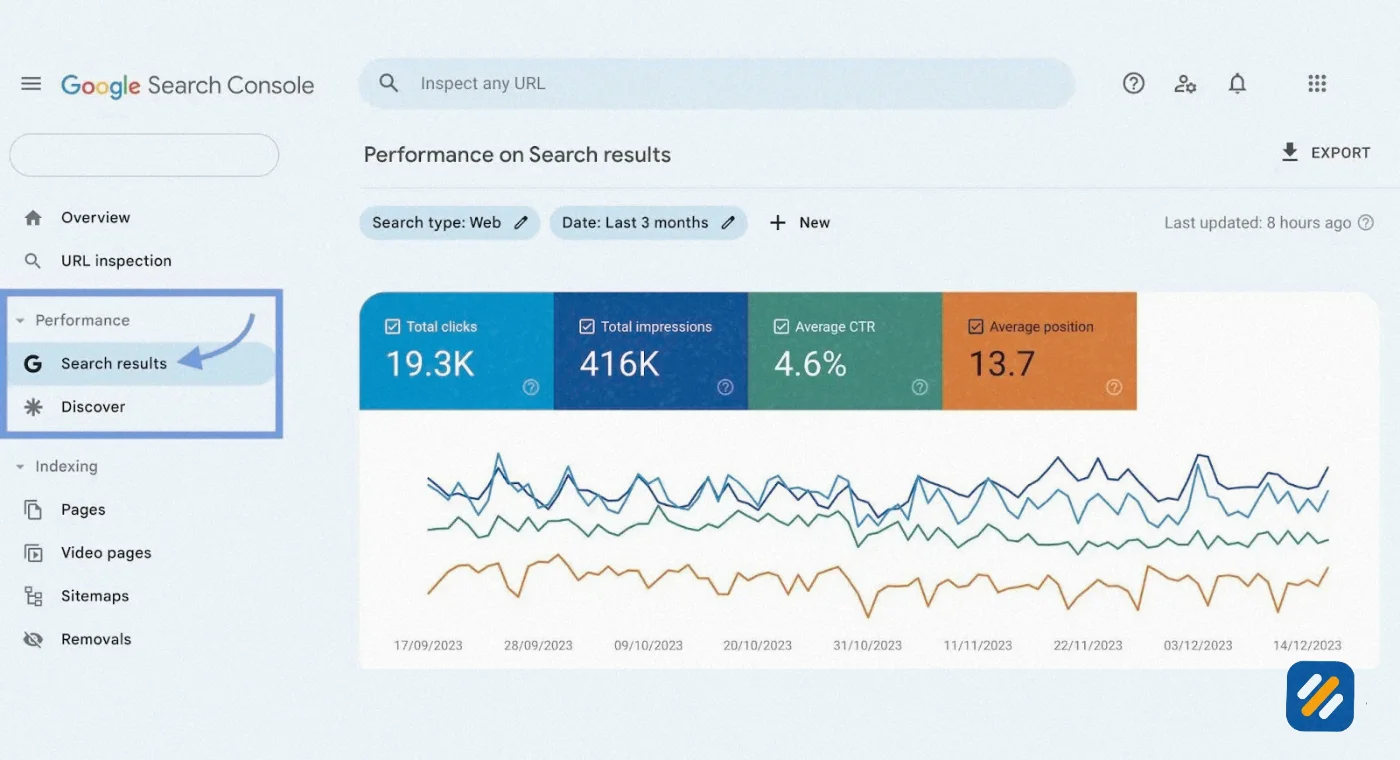
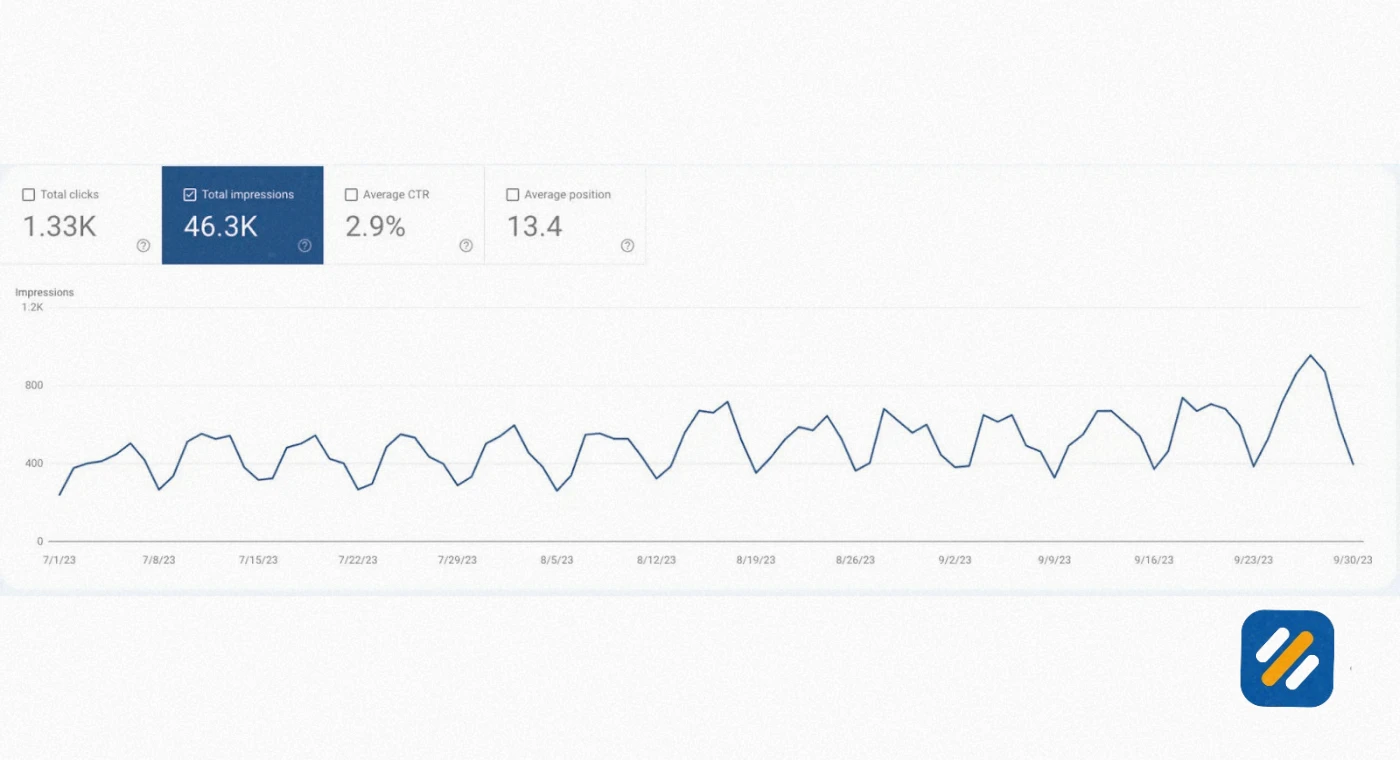
Open GSC, click Performance in the left sidebar, and set the date range to the last 28 days compared to the previous 28 days. Look at total clicks, total impressions, average CTR, and average position. A drop in clicks with stable impressions means CTR is falling. A drop in impressions means rankings are falling.
Step 4: Check organic traffic by landing page monthly.
In GA4, go to Reports then Acquisition then Traffic Acquisition. Filter by Organic Search to see which pages are driving the most SEO traffic. This tells you which articles are working and which need to be updated or promoted more aggressively.
Step 5: Look for traffic trend patterns quarterly.
Every three months, compare your organic traffic quarter over quarter. A growing trend confirms your strategy is working. A declining trend despite consistent publishing is a signal to audit your technical SEO health and check for Google algorithm update impacts on your niche.
5 How to Track Keyword Rankings and SERP Performance
Tracking keyword rankings is where most beginners either go wrong or skip entirely. Checking rankings manually by searching Google yourself produces inaccurate data because Google personalises results based on your location, search history, and device. What you see is not what your target audience in the US or UK sees.
Here is the correct process for tracking search engine rankings accurately:
Using Google Search Console for free ranking data:
In GSC, go to Performance and click on the Queries tab. This shows you every keyword your site received impressions for in the last three months, along with your average position for each. Filter by a specific page using the Pages filter to see which keywords are driving traffic to individual articles. Any keyword where your average position is between 5 and 15 is a priority optimisation target because a small improvement can move it to page one.
Using a dedicated rank tracker for accuracy:
GSC shows average positions over a time period, which smooths out daily fluctuations. A dedicated rank tracker shows you your exact position on a specific day for a specific keyword in a specific location. For a website targeting US and UK audiences, you need to track rankings separately for each country. Ahrefs Rank Tracker, SEMrush Position Tracking, and SERPWatcher are the three tools most commonly used for this. Even the free tier of Ahrefs Webmaster Tools gives you ranking data for keywords you rank for organically.
What to do when rankings drop:
A ranking drop for a specific keyword on a specific page is a signal to investigate. Check whether a Google algorithm update was released around the time of the drop. Check whether a competitor has improved their content or earned new backlinks for that keyword. Check whether your page has any new technical issues blocking it in GSC. Most ranking drops have a clear cause once you know where to look.
6 How to Track Competitor Rankings and SEO Campaign Performance
Knowing your own rankings is only half the picture. The other half is knowing how your rankings compare to your competitors for the same keywords. A position 4 ranking that was position 6 six months ago is growth. A position 4 ranking that was position 2 six months ago is a problem you need to address immediately.
Here is how to track competitor rankings effectively without spending money on premium tools
Method 1: Google Search Console comparison
GSC does not show competitor data directly but it shows your average position for every keyword you appear for. By tracking your average position over time across your core keywords, you can infer when a competitor has overtaken you by watching your position rise or fall.
Method 2: Ahrefs free Webmaster Tools competitor overview
Ahrefs free Webmaster Tools lets you see which keywords your site ranks for and what other sites appear alongside yours for those keywords. This gives you a free list of direct competitors for each keyword you are tracking.
Method 3: Manual SERP checks for priority keywords
For your ten most important target keywords, do a monthly manual check using an incognito browser window. Note which competitors appear in positions 1 through 5. If the same competitor appears consistently across multiple keywords, they are your primary organic competitor and their content strategy is worth studying in detail.
What to do when a competitor outranks you:
Study their ranking page carefully. Look at their content depth, heading structure, internal links, and any data or examples they include that your page does not. Check their backlinks in Ahrefs to see if they have earned links from domains you could also target. In most cases a competitor outranking you on a keyword you previously held is a content quality signal, not a technical one.
7 Free vs Paid SEO Tracking Tools | Which Do You Actually Need
| Tool | Cost | Best For | Key Metrics It Tracks |
|---|---|---|---|
| Google Search Console | Free | Organic traffic, rankings, indexing, CTR, Core Web Vitals | Clicks, impressions, average position, indexed pages, crawl errors |
| Google Analytics 4 | Free | Conversion tracking, traffic by channel, user behaviour | Organic sessions, conversions, bounce rate, landing page performance |
| Ahrefs Webmaster Tools | Free | Backlinks, referring domains, keyword rankings | DR, backlinks, referring domains, organic keywords |
| Screaming Frog Free | Free up to 500 URLs | Technical SEO issues, crawl errors, broken links | 404 errors, redirect chains, duplicate content, missing meta tags |
| Google PageSpeed Insights | Free | Core Web Vitals, page speed scores | LCP, INP, CLS, mobile and desktop performance scores |
| Ahrefs Rank Tracker | Paid | Accurate daily keyword ranking tracking | Position history, SERP features, competitor rankings |
| SEMrush | Paid | Full SEO campaign performance tracking | Rankings, traffic, backlinks, technical issues, competitor data |
| Looker Studio | Free | Building visual SEO dashboards | Connects to GSC, GA4, and other data sources for custom reporting |
For a personal brand blog or small business website in its first twelve months, the free tools cover everything you need. Google Search Console plus Google Analytics 4 plus Ahrefs Webmaster Tools give you accurate data on every metric that matters at zero cost.

8 How to Build a Simple SEO Dashboard Without Paying for Tools
An SEO dashboard is a single view that shows all your key metrics in one place so you can assess your campaign performance at a glance without opening five different tools.
The most practical free SEO dashboard for a small website is built using Looker Studio connected to Google Search Console and Google Analytics 4. Here is how to set it up
Step 1: Go to lookerstudio.google.com and create a free account.
Step 2: Create a new report and add Google Search Console as your first data source. Connect it to your verified GSC property.
Step 3: Add Google Analytics 4 as your second data source. Connect it to your GA4 property.
Step 4: Build these five core dashboard widgets:
- Total organic clicks over the last 90 days as a line chart
- Top 10 keywords by clicks as a table
- Average position trend for your top keywords as a line chart
- Organic conversions from GA4 as a scorecard
- Pages with the most impressions but lowest CTR as a table
Step 5: Share the dashboard link with anyone who needs to see your SEO progress. Looker Studio dashboards update automatically as new data arrives in GSC and GA4.
This dashboard gives you a live view of your SEO campaign performance that updates daily without any manual data entry or spreadsheet maintenance.
9 How to Track Technical SEO Issues Before They Kill Your Rankings
Technical SEO issues are the silent killers of organic traffic. A site with great content and strong backlinks can lose half its traffic overnight if a technical issue goes undetected. Here is how to monitor technical health as part of your regular SEO tracking routine:
Weekly check in Google Search Console:
Open the Pages report and look at the "Why pages aren't indexed" section. Any increase in crawl errors, soft 404s, or pages blocked by robots.txt needs immediate investigation. A sudden change in your indexed pages count is always a priority alert.
Monthly crawl with Screaming Frog:
Run a fresh crawl of your entire website and filter for 4XX errors, redirect chains, missing title tags, duplicate meta descriptions, and pages with no internal links pointing to them. Export the results and compare them to the previous month's crawl to identify new issues.
Quarterly Core Web Vitals check:
Open Google Search Console and go to the Experience section. Review your Core Web Vitals report for both mobile and desktop. Any pages in the "Poor" category are actively being disadvantaged in mobile search rankings and need to be prioritised for speed optimisation.
After any major site change:
Whenever you update your WordPress theme, install or remove plugins, change your permalink structure, or migrate your site, run an immediate Screaming Frog crawl to catch any technical issues the change introduced before Google's next crawl discovers them.
10 3 Expert SEO Tracking Tips That Most Guides Never Tell You
Tip 1: Track ranking position changes weekly, not monthly.
Most SEO guides recommend monthly tracking. In practice, a page that drops from position 3 to position 12 in a week needs attention immediately, not in 30 days. Weekly ranking checks let you catch competitor movements, algorithm update impacts, and content decay early enough to respond before traffic drops significantly.
Tip 2: Filter your GSC data by device before making any optimisation decision.
A page with an average position of 6 on desktop and position 18 on mobile has a mobile-specific problem, not a content problem. Before spending hours improving the content on an underperforming page, filter your Search Console Performance report by device. The split between desktop and mobile performance often reveals the real cause of a ranking issue that content changes alone will never fix.
Tip 3: Set up a "wins and losses" tracking log alongside your tool data.
Every week, note one thing that improved and one thing that dropped in a simple document or spreadsheet alongside your metrics. Over three to six months this log becomes your most valuable SEO asset. It shows you exactly which actions produced which results on your specific website in your specific niche, which is far more actionable than any general SEO advice you will find online.
11 Conclusion
SEO tracking is not complicated but it does require consistency. The websites that rank and grow are not necessarily the ones doing the most sophisticated SEO work. They are the ones who measure regularly, understand what their data is telling them, and make clear decisions based on that understanding.
Start with Google Search Console today. Set up your Performance report. Note your top ten keywords by clicks. Write down their average positions. Come back in four weeks and compare.
That simple routine, repeated consistently, is how SEO tracking actually works in practice. And it is how you turn a new website into a growing source of organic traffic over the next twelve months.
Have a question about how to track a specific SEO metric? Drop a comment below and I will answer it personally.
Join 1,000+ business owners and bloggers who get one actionable SEO tip every week — straight to their inbox. Free forever.
Get Free Weekly Tips →